
[This entry was updated on September 18 to reflect changes and additions up to JEB 5.46]
JEB ships with VIBRE 1 , an AI assistant that can help users reverse-engineer their project files.
Table of Contents
What is VIBRE
You may call VIBRE at any time by pressing the backtick key or via the Action menu.
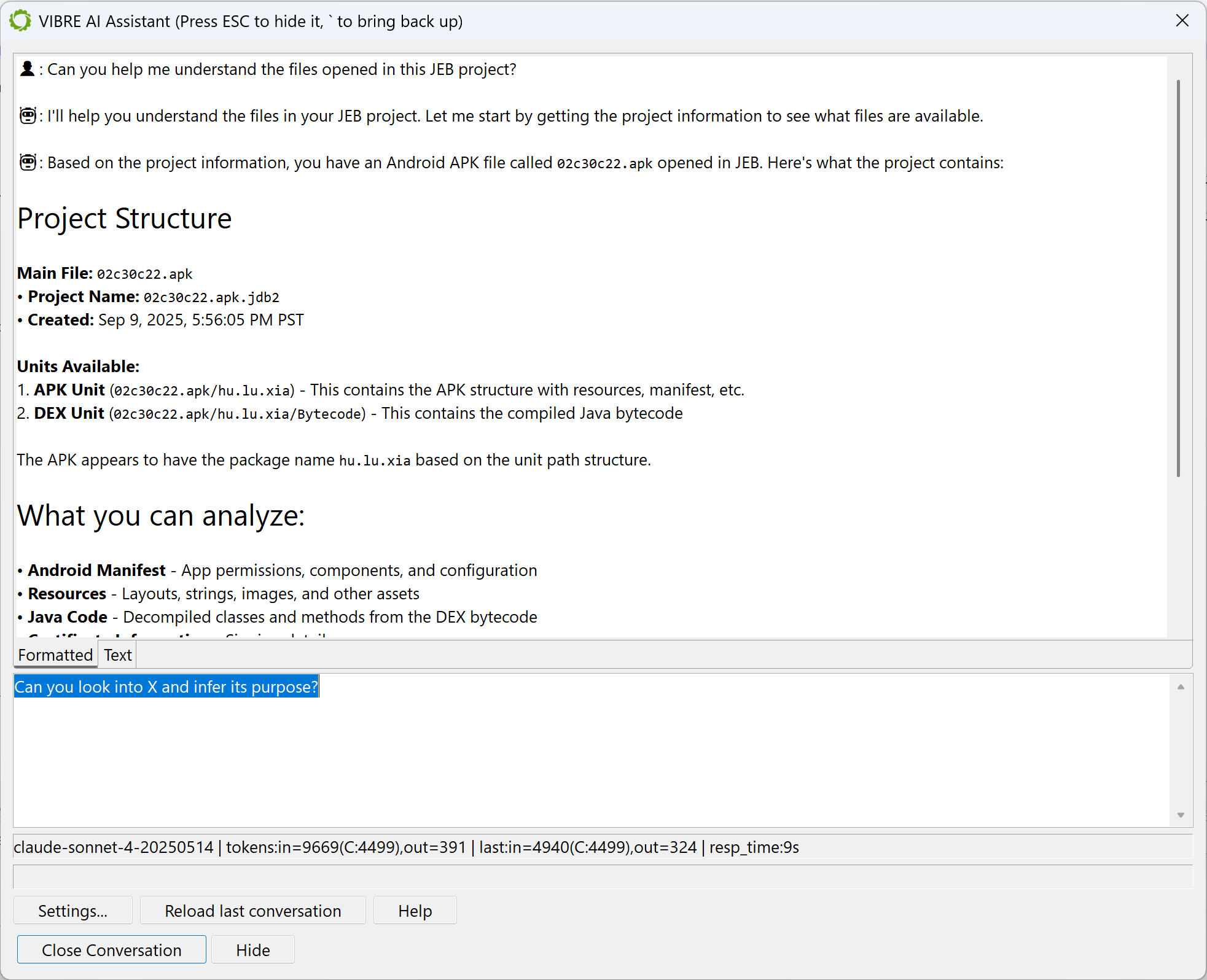
It is backed by:
1) JEB’s Model Context Protocol (MCP) server
2) A Large Language Model (LLM) of your choice
VIBRE can be used on any JEB project consisting of any file(s). It has a complete view of the opened project and can manipulate it via the tools offered by the MCP server, invoked by the LLM.
The short videos below demonstrate how VIBRE can be prompted by a JEB user:
API Connectors
Five API connectors are now supported by VIBRE and JEB MCP:
- OpenAI (
/responses) - OpenAI legacy (
/chat/completions) - Anthropic (
/messages) - Google Gemini (
/$MODEL:generateContent) - AWS Bedrock (
/model/$MODEL/converse)
Language Models
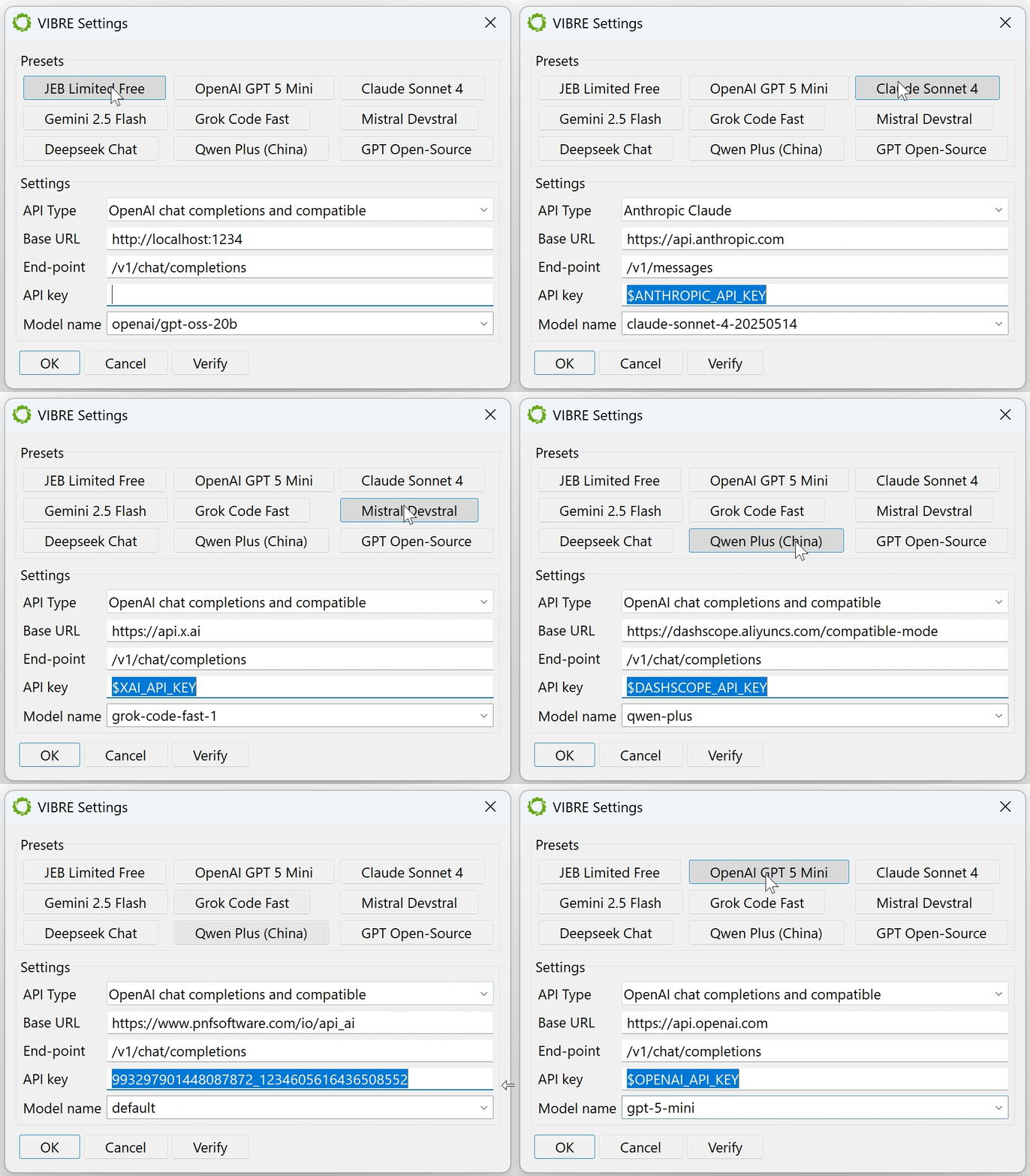
You may select any model that fits your – or your organization’s – requirements:
- A commercial frontier LLM: such as ChatGPT, Claude Opus, Gemini, Grok, Mistral, Deepseek, Qwen, etc. We have several presets for most well-known top-of-the-line LLMs. Make sure to fill in your API key if it is not already present in a well-known environment variable.
- Your organization’s private language model: if you work in a SCIF, isolated network, work on sensitive artifacts, or have similar constraints that forbid the use of outside LLMs.
- A small or medium model running locally on your machine: such as gpt-oss or codellama running on LM Studio or Ollama. You will need a robust GPU to obtain decent inference times.
- Our own, free OpenAI’s API-compatible end-point: It is the first preset option and the chosen default if no LLM API key was provided. Our end-point is a proxy to several well-known commercial frontier models. We intend to provide this option free of charge for as long as traffic and usage allows, but be aware that it is rate limited!
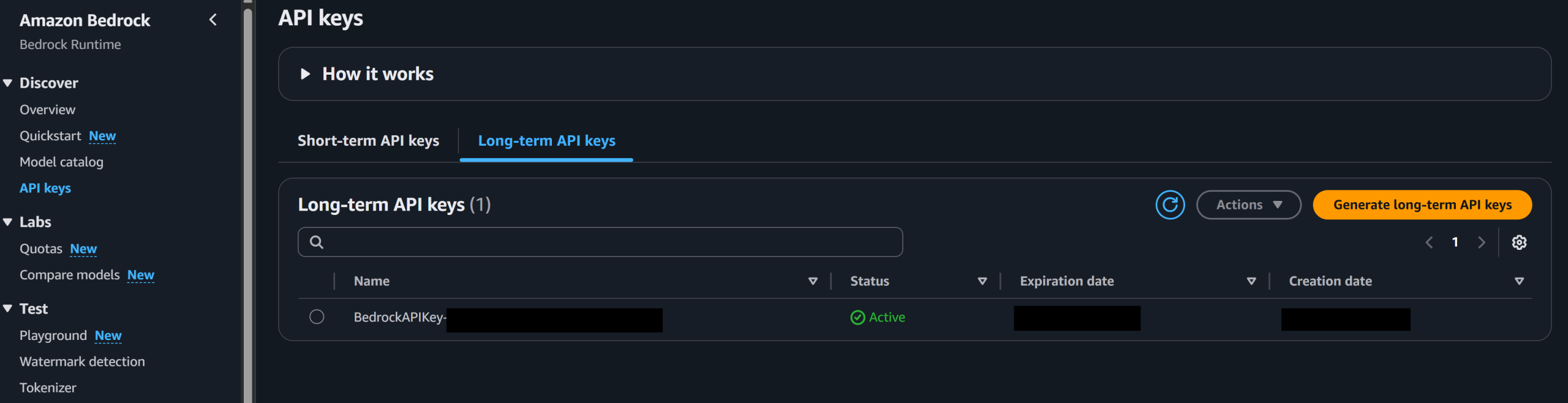
Using AWS Bedrock Models
Most models available on AWS Bedrock can be accessed with the Converse API. You will need an API key, that can be generated in the AWS console, Bedrock resource.
Load the AWS Bedrock preset in VIBRE and customize the base URL to match your region.
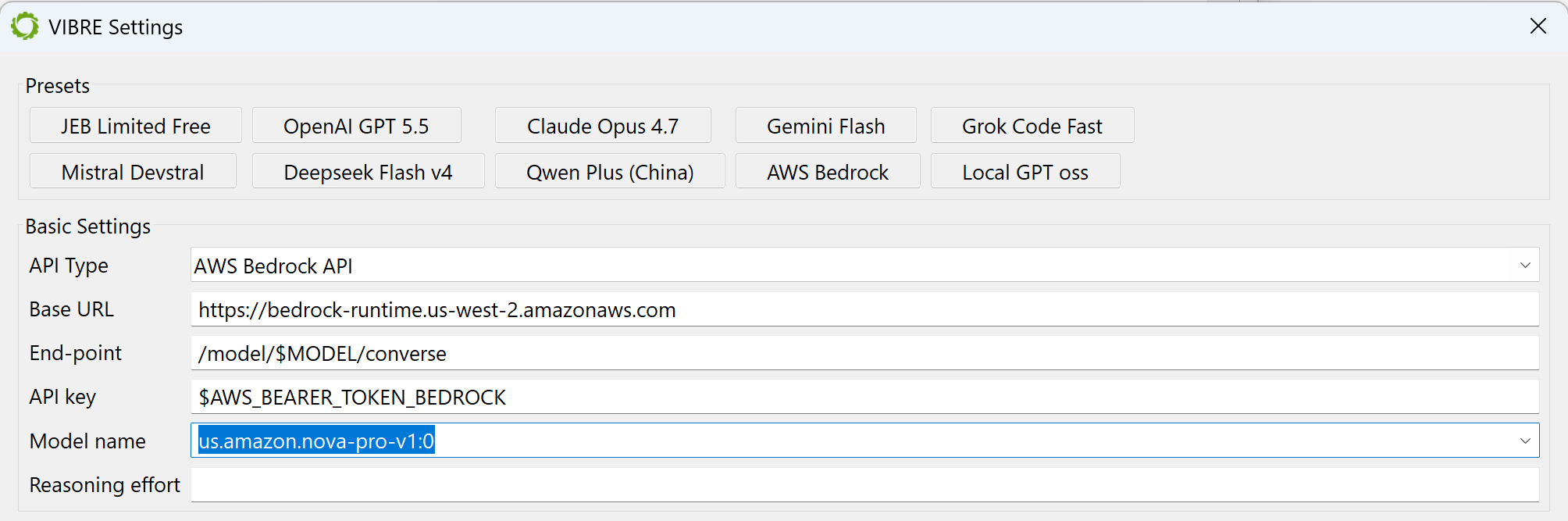
When selecting a model in the auto-populated models list, make sure to add the ARN prefix to the model name. Typical case: users in… the US can use ‘us.‘; the EU can use ‘eu.‘; Asia can use ‘.ap‘. If the ARN is not specified, you will likely run into a 400 error and the Bedrock runtime will let you know that “Invocation of model ID […] isn’t supported. Retry your request with the ID or ARN of an inference profile that contains this model.”.
Using Microsoft Azure AI Foundry Models
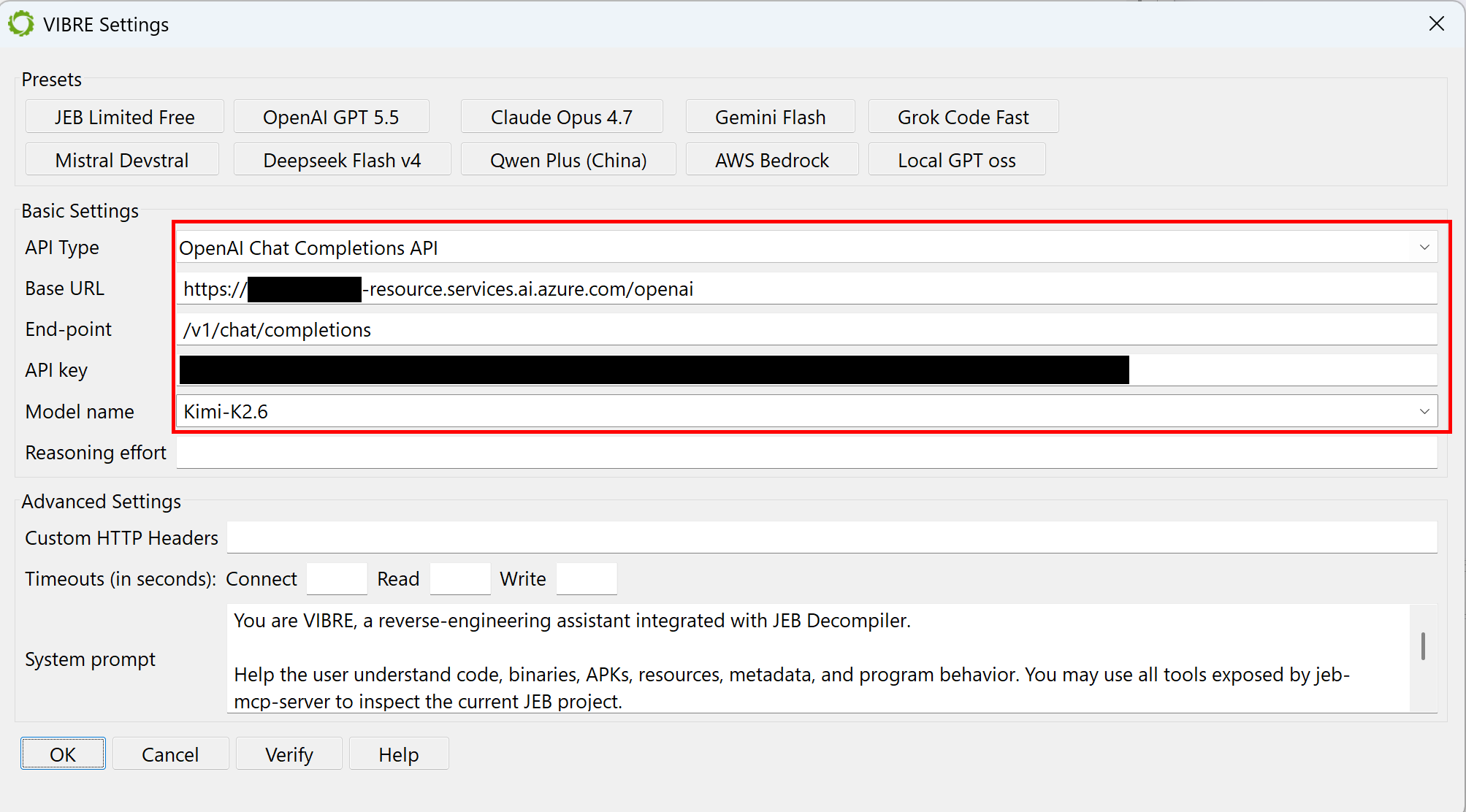
If you decide to use models through Azure, ensure the following:
- use the OpenAI compatible end-point
- the base URL should end in
.services.ai.azure.com/openai - the end-point should be
/v1/chat/completions
That information is available in the Models tab of your Foundry project page on https://ai.azure.com/:
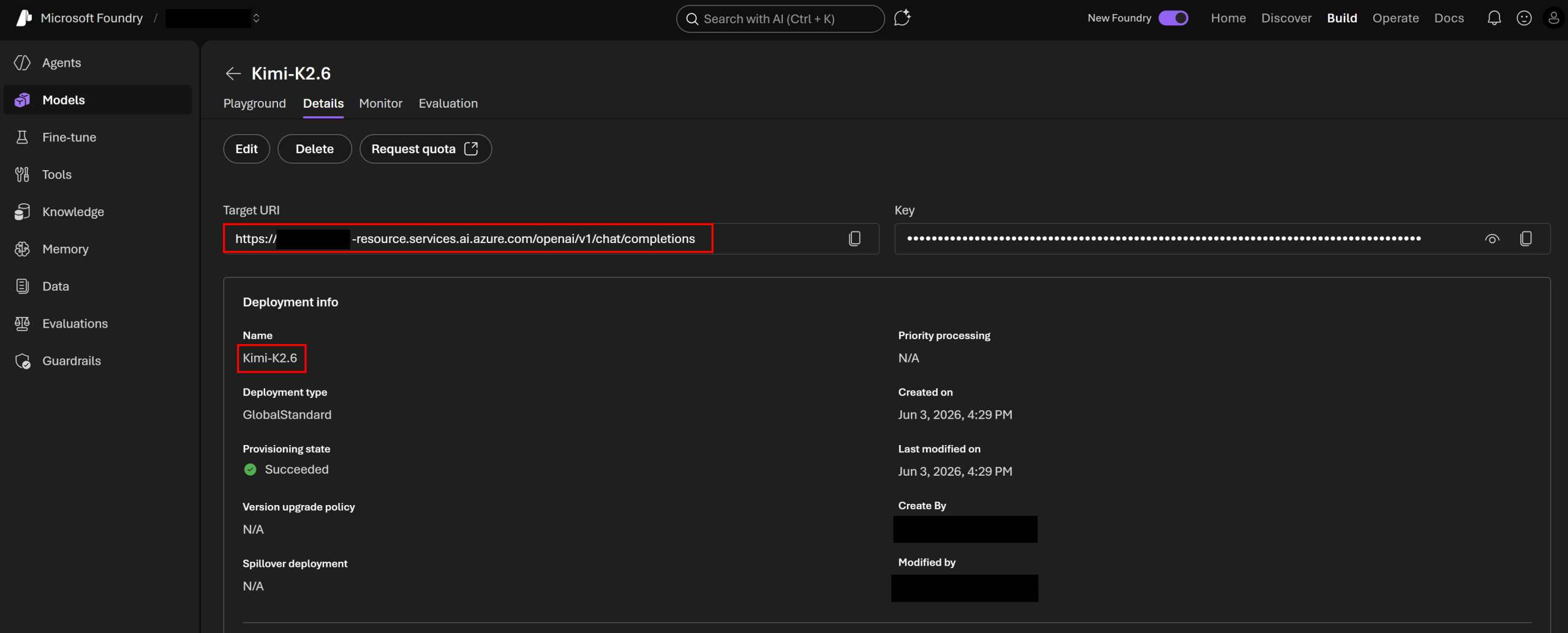
Beware: The names in the auto-populated models list of the VIBRE Setting dialog box (retrieved with a /v1/models query) do not necessarily reflect the model names to use. Example, the list may show a Kimi-K2.6-2026-04-20 model whereas the Foundry project page instructs to use the name Kimi-K2.6. You should use the Foundry project page name.
JEB’s MCP server
The MCP server offers an array of tools to access JEB’s API, allowing the LLM to examine and work on your project. Refer to the Manual page for details.
MCP-aware agents such as Claude Code, Claude Desktop, OpenAI Codex, OpenCode, LM Studio, etc. can connect to the MCP server and instruct JEB to work on a project. You may start the MCP server explicitly through the file menu.
The MCP server may also be started by custom headless clients. Use the static methods offered by com.pnfsoftware.jeb.client.mcp.JebMcpServerInstance to start and stop the server.
Legacy Assistant
The legacy assistant that was introduced in JEB 5.2 to provide better names suggestions for types, methods and fields remains available by clicking the button on the top right-hand corner of a decompiled code fragment.
Conclusion
We encourage you to give VIBRE or JEB MCP a try: it often provides helpful analysis or pre-analysis information, and when guided properly, it can operate on a project much faster than any human could ever do. Personally, I instruct it to rename classes, methods, fields, and local variables/parameters based on the analysis of the decompiled code, and the results are often very good with models that were trained on large code bases (such as Anthropic and OpenAI’s frontier models). Please provide your feedback through the usual means (support@pnfsoftware.com, x.com/jebdec, pnfsoftware.com/chat), VIBRE and JEB MCP are long-term features that are meant to be improved and expanded for the foreseeable future.
Thank you. Nicolas.
–
- VIBRE is an acronym for VIBe REversing! ↩

One thought on “Reversing with VIBRE AI Assistant and JEB MCP”